Menu
Provider Review

Payoneer Review 2026: Fees, Verification & What Nobody Tells You

Is Payoneer worth it in 2026? We break down every fee, test the verification process, and used Payoneer for 13 months. .

An honest Payoneer review based on real business account experience. Complete fee breakdown, safety assessment, KYC verification timeline, and use.

Complete fee breakdown: receiving, withdrawal, card, FX conversion
Real KYC verification timeline (spoiler: it took 60 days, not 3)
Head-to-head comparison with Wise and PayPal for international businesses
GrowAcross TeamPublished
12 minLast updated

Key Criteria to Evaluate International Digital Banks

Fintech business banking evaluation requires systematic assessment across six critical dimensions: regulatory licensing, currency support, fee structure transparency, integration capabilities, deposit protection, and operational restrictions. Each criterion carries different weight depending on business model, transaction volumes, and geographic focus.

Regulatory Licensing Assessment

Banking licenses provide the highest protection level with deposit insurance up to statutory limits. E-money licenses require fund safeguarding but offer no insurance protection. Agent banking arrangements depend on the principal bank's license status. Singapore's MAS, Hong Kong's HKMA, and UAE's CBUAE each maintain different licensing standards and consumer protections.

Currency Support & Geographic Coverage for Multi-Country Operations

  • Multi-currency accounts: Native support for 5+ major currencies with competitive exchange rates
  • SWIFT network access: Direct correspondent banking relationships vs third-party payment processors
  • Local payment systems: Integration with domestic clearing systems for faster, cheaper transactions
  • Regulatory compliance: CRS/FATCA reporting capabilities and sanctions screening systems

How We Reviewed Payoneer

We opened our Payoneer account in April 2025 and have used it since. The detailed observations in this review cover our first 13 months of usage (April 2025 to May 2026) and were re-verified against current pricing in September 2026.

What we documented first-hand:

  • Onboarding period: 6 weeks (April to May 2025) during which we logged 12 KYC back-and-forth exchanges with Payoneer compliance, including a bank statement compliance review
  • Verification timeline: from initial registration in April 2025 to first received payment in May 2025
  • Fee structure: every transaction fee observed on our actual statements across 13 months of usage

Limitations of this review: our experience reflects opening from a Hong Kong limited company. Onboarding experiences from other business registration countries may differ. We have not directly tested marketplace integrations (Amazon, Upwork, Fiverr, Awin, etc.); fees for those use cases reflect Payoneer's published rates, not our direct experience.

Where we cite Payoneer's official pricing or terms, the source is payoneer.com (verified September 2026).

What is Payoneer and How Does It Work for Businesses?

Payoneer is a financial services company that provides international money transfer and digital payment services. Founded in 2005 and publicly traded on NASDAQ (PAYO), it serves millions of customers in more than 190 countries.

For businesses, Payoneer offers local receiving accounts in multiple currencies (USD, EUR, GBP, and others), allowing your international clients to pay you as if you had a local bank account in their country. US clients can send payments via ACH transfer instead of expensive SWIFT wires, while European clients can pay via SEPA. This eliminates costly international transfer fees and makes cross-border payments faster and cheaper.

Key features include multi-currency accounts, a Mastercard debit card, marketplace integrations (Amazon, Fiverr, Upwork), and B2B payment solutions. Payoneer is regulated as a licensed money transmitter in the US and authorized by the FCA in the UK.

But is Payoneer actually good in practice? That depends on your tolerance for bureaucracy. Here's my real experience.

Why I Needed Payoneer for International Business Payments

We run a Hong Kong-registered limited company. My clients are primarily in Europe, paying in EUR. The problem: receiving EUR directly to a Hong Kong bank account means high SWIFT fees and poor exchange rates. I needed a European IBAN so my clients could pay via simple SEPA transfer.

I needed a solution that would give me:

  • A local EUR receiving account (so clients pay like a domestic transfer)
  • Reasonable FX fees for EUR to USD or HKD conversion
  • The ability to withdraw to my traditional bank account

Payoneer seemed perfect on paper: local receiving accounts in 70+ currencies, 0.50% FX fees, and a physical Mastercard. Their marketing promised account setup in "a few simple steps."

Here's what actually happened.

Payoneer Registration Process: Step-by-Step Setup

The initial signup was straightforward. I provided:

  • Company registration documents
  • Passport copy
  • Proof of address
  • Company bank details

Within hours, I received a welcome email confirming my registration and directing me to complete verification.

The email mentioned specific requirements for my jurisdiction and directed me to provide documentation for approval. Simple enough, I thought. I was wrong.

Obstacle 1: Bank Statement Rejection

A few days after registration, I received an email requesting additional verification.

They wanted a bank statement showing:

  • Account owner name
  • Bank account number
  • Bank logo
  • Bank name
  • Date of issue (not older than 3 months)

I submitted my statement. Rejected.

The reason? What I learned the hard way: Payoneer does NOT accept statements from digital banks or neobanks.

If you're using Airwallex, Wise Business, Revolut Business, or similar fintechs as your primary bank, your documents will likely be rejected. They require statements from traditional banks like HSBC, Citi, or local equivalents, if you don’t have one yet, check our guide on how to open a business bank account as a non-resident.
I resubmitted using my HSBC statement. Still had to go through multiple rounds.

Obstacle 2: The KYC verification loop (12 exchanges)

After resolving the bank statement issue, I thought I was done. Then came another email.

"Typically, account applications are reviewed within 3 business days but can sometimes take a bit longer."

Three days passed. Then a week. Then another email asking for MORE documents.

The cycle repeated:

  1. Submit documents
  2. Wait 3-5 business days
  3. Receive request for additional documents
  4. Repeat

Support was reactive: we received generic email responses, and the phone line could not access the compliance file.

After 6 weeks of back-and-forth, my account was finally approved. Total time from registration to approval: 2 months.

Obstacle 3: Payment Rejected

Even after approval, problems continued. A European client sent me a payment of several hundred euros. Payment blocked.

The issue: Payoneer considered that my client paid from their personal bank account instead of their company account. Payoneer's receiving accounts only accept payments from business bank accounts.

The payment was returned to my client within 7-10 business days. No fees charged, but a significant delay and an awkward conversation explaining what happened.

How I solved it: I ask the client to pay directly on a local traditionnal bank account.

Payoneer Verification Timeline: How Long It Really Takes

  1. 1
    Initial registration

    Quick and easy online form

    Day 1
  2. 2
    First document request

    Expected: standard KYC

    Day 2
  3. 3
    Bank statement rejected

    First setback

    Day 7
  4. 4
    Resubmission + wait

    Days 8-21

    Multiple rounds
  5. 5
    KYC additional requests

    Days 22 to 45

    Extended verification, days 22 to 45
  6. 6
    Account approved

    Finally!

    Day 60
  7. 7
    First payment received

    Payoneer promises few days. My reality: 2 months.. Working smoothly since

    Day 65

Account holds: what to expect

We experienced this directly. During our testing, Payoneer placed one hold on our account. It lasted 1 business day and was lifted after we provided the supporting document the compliance team requested. The process was not fast or transparent, but it had a clear cause and a clear resolution.

As Payoneer describes them, holds are triggered by compliance and KYC reviews: the company pauses activity while it verifies a transaction, a document, or a change in account details. This is standard practice for a regulated payment institution, and it is the mechanism behind most of the "frozen account" stories users report.

Public complaints about Payoneer account restrictions do exist, and they are easy to find on review platforms. We do not reproduce them here because individual cases cannot be independently verified, but the recurring theme, funds locked while a review is open, is consistent with how compliance reviews work. It would be misleading to pretend these complaints do not exist, and equally misleading to present them as the typical outcome.

Based on our experience, three practical steps reduce the risk and the downtime: keep your identity and business documents up to date in the account, respond quickly and completely when Payoneer requests information, and keep a backup bank account so a review does not block your cash flow.

What Actually Works Well with Payoneer (After Verification)

Once approved, Payoneer does deliver on its core promises:

Local Receiving Accounts

I now have a EUR receiving account via Banking Circle S.A. (a licensed EU bank). My European clients pay via standard SEPA transfer, no SWIFT fees, fast arrival (1-2 business days), and they pay the same as if paying any local European company.

Payoneer Get paid fees: EUR receiving free, credit or debit card 3.00%, PayPal 3.99% plus fixed fee (September 2026)

I also activated a USD SWIFT receiving account for clients outside Europe. Zero loading fees from Payoneer's side.

Competitive FX Rates

The 0.50% conversion fee is competitive. For a EUR 1,000 payment, I pay EUR 5 in fees (verified September 2026). Much better than the 2% to 4% I was losing with traditional bank transfers.

Multi-Currency Wallet

I can hold EUR, USD, GBP and convert between them on demand, useful for managing cash flow and timing conversions when rates are favorable.

For a full comparison of traditional banking options, see our guides to Hong Kong business banking and Singapore business banking.

Complete Payoneer Fee Breakdown

Account setupFREE
Payoneer-to-Payoneer receivingFREE
Receiving via local accounts (local currency)FREE
Receiving via local accounts (other currencies)Fixed fee or 1%
ACH bank debit receiving (US only)1%
Credit card receivingUp to 3.99% + $0.49
Pay to Payoneer user (different country)Up to 1% (min $4)
Pay to Payoneer user (same country)Flat fee up to $4
Pay to non-Payoneer bank1-4%
Same-currency withdrawal (USD/EUR/GBP)$1.50 flat
Reduced withdrawal tier (certain US customers only)$1.50 up to $50K/mo then up to 0.5%
Withdrawal to a Hong Kong bank (EUR to HKD)1.20% plus about 1.66% ECB spread; all-in about 2.86%
Cross-currency withdrawal1.2% to 4%
Internal FX conversion0.5%
Annual card fee (first card)$29.95
Additional cardsFREE
Card FX conversionUp to 3.5%
Card cross-border feeUp to 1.8%
ATM withdrawal (same currency)$3.15 + up to 1.8%
ATM withdrawal (with FX)$3.15 + up to 3.5%
Card replacement$12.95
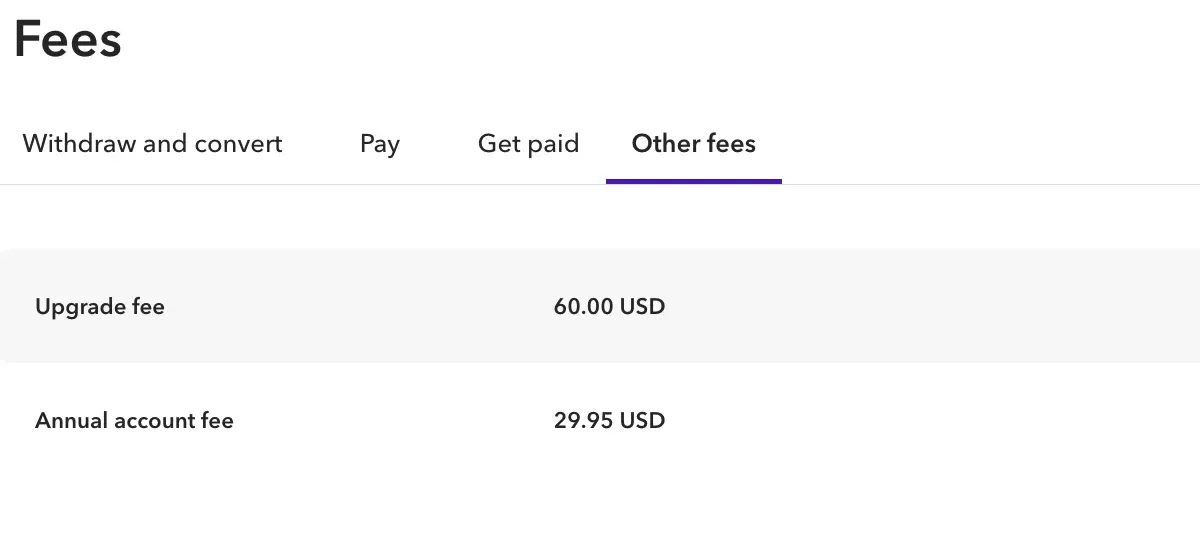
Annual account fee$29.95 (waived if >$6K received/12mo)
Premium plan upgrade fee60.00 USD (reported)

The tier of $1.50 then 0.5% on withdrawals up to $50,000 per month applies only for certain US customers, depending on their registration date. It is not a general pricing rule and should not be treated as one when planning withdrawals.

All fees verified from Payoneer's official pricing page. Last updated by Payoneer on January 1, 2026.

What Payoneer really costs: a worked yearly example

Published fee schedules list maximums. To show what Payoneer costs in practice, we use two real withdrawal transactions from our own Hong Kong Ltd account: EUR 1,370 on September 1, 2026, and EUR 815 on August 18, 2026. In both cases we sent EUR from the Payoneer balance to our Hong Kong bank account, converted to HKD.

Each transaction carried an explicit fee of 1.20%. On top of that sits the exchange rate spread, measured against the ECB EUR/HKD reference rate, never against a conversion website. For the September 1 transaction, Payoneer's applied rate was 8.938423 against an ECB reference of 9.0877, a gap of 1.64%. For the August 18 transaction, the applied rate was 8.927705 against an ECB reference of 9.0799, a gap of 1.68%. Across the two transactions, the spread averaged about 1.66%.

Adding the explicit fee to the spread, the all-in cost of each withdrawal came to about 2.86%. On EUR 2,185 withdrawn across the two transactions, that is roughly EUR 62 in total cost. Receiving EUR payments into the account was free.

Other costs apply in different situations: 0.50% for a currency conversion between Payoneer balances, 0.30% for P2P payments to Greater China and 0.60% elsewhere in our account, and an annual account fee of 29.95 USD if the account receives less than 6,000 USD over 12 consecutive months. The reduced withdrawal tier sometimes quoted for amounts up to $50,000 per month applies only to certain US customers depending on their registration date, so we exclude it from this example.

The Payoneer Annual Fee ($29.95) Explained

This is the most misunderstood Payoneer fee. The $29.95 annual account fee is only charged if you receive less than $6,000 (or equivalent) in any 12 consecutive months. If your account receives $6,000+ annually, you never pay this fee. It's essentially an inactivity fee, not a maintenance fee.

Separately, the Payoneer card also has a $29.95/year fee. These are two different charges: one for the account (avoidable), one for the card (unavoidable if you have a card).

How to Minimize Payoneer Fees

  • Receive in local currency whenever possible. Receiving USD in the US, EUR in Europe, or GBP in the UK via your Payoneer receiving account is free.
  • One pricing detail sometimes quoted online, a reduced fee on monthly withdrawals up to $50,000, only concerns certain US customers depending on their registration date. It does not apply to most accounts, so we do not recommend building a withdrawal strategy around it.
  • Avoid unnecessary currency conversions. If you're paid in USD and your expenses are in USD, withdraw directly without converting. The 0.5% internal FX fee adds up.
  • Use Payoneer-to-Payoneer transfers when paying other Payoneer users in your country, same-country transfers have a flat fee instead of a percentage.
  • Ensure you receive at least $6,000/year to avoid the $29.95 annual account fee.

Several of the fees we observed in our own account came in below the public maximums: our card transaction fee was 3.00% (against up to 3.5% listed), and our P2P fee was 0.30% for Greater China and 0.60% elsewhere (against up to 1% listed). Payoneer's own fee page now notes that listed figures are the maximum possible and that the final fee may be lower; our account screenshots support that.

Is Payoneer safe and legit?

Payoneer is a regulated payment company, not an unlicensed intermediary. It is registered or licensed with FinCEN in the United States, the FCA in the United Kingdom, and the Central Bank of Ireland in the European Union, per Payoneer's published legal information. The company is listed on NASDAQ, which subjects it to public reporting requirements, and in June 2026 it announced a pending acquisition by Nuvei (investor relations, Q2 2026, August 6, 2026).

Client funds are held in segregated accounts, separate from Payoneer's own operating funds. One point to understand clearly: Payoneer balances are not bank deposits, so they are not covered by deposit insurance schemes such as FDIC in the United States or FSCS in the United Kingdom. Segregation protects the funds if the company fails; it is not the same thing as deposit insurance.

On the usage side, we have held and used a Payoneer account for a Hong Kong company since April 2025 without any account freeze. Our only incident was a one-business-day hold, resolved after we provided a supporting document.

Finally, a note on public reviews: as of September 2026, Trustpilot no longer displays a score for Payoneer following a breach of its platform guidelines. The profile still shows 63,364 reviews, 15% of them one-star, with positive reviews praising marketplace payments and negative reviews citing account restrictions and slow support. We report this factually; our editorial score of 4.0 is based on our own first-hand testing and is independent of Trustpilot.

Payoneer vs Wise vs PayPal: Head-to-Head Comparison

Best forMarketplace sellers (Amazon Fiverr Upwork)International SMEs & freelancersUS-focused sellers & buyers
FX conversion fee0.5% internal + up to 3.5% cardFrom 0.33% (mid-market rate)3-4% above mid-market
Receiving from clientsFREE (Payoneer-to-Payoneer) or up to 3.99%FREE (local details) or $6.11 wire2.99% + $0.49 (standard)
Same-currency withdrawal$1.50 flatVaries by corridor (from $0.57)FREE to US bank
Cross-currency withdrawal1.2% to 4%From 0.33% all-in3-4% markup
Currencies held8 receiving accounts40+ currenciesUSD EUR GBP CAD AUD
Monthly fee$0$0$0 (personal) / from $5 (business)
Card$29.95/yr + up to 3.5% FXFree (select countries) + mid-market FXFree + 3-4% FX
Marketplace integrations2000+ (Amazon Fiverr Upwork Airbnb)LimitedeBay + own ecosystem
RegulationNASDAQ-listed MSB + FCALSE-listed + FCA + multipleNASDAQ-listed + multiple
Deposit insuranceNo (segregated funds)No (safeguarded funds)Yes (FDIC up to $250K)

Data verified from official pricing pages, September 2026. Fees may vary by region.

Choose Payoneer if you receive payments from marketplaces like Amazon, Upwork, or Fiverr. Choose Wise for the lowest FX conversion fees. Choose PayPal if your clients prefer it or you need buyer/seller protection. Read our full Wise Business review for a detailed comparison.

When Payoneer Beats Wise

Payoneer wins hands-down for marketplace sellers. If you sell on Amazon, work on Upwork, or freelance on Fiverr, Payoneer's direct integrations mean you get paid faster with fewer steps. Wise doesn't have these marketplace partnerships, you'd need to manually add your Wise account details, and some platforms don't support it.

When Wise Beats Payoneer

For everything else, Wise is cheaper. The FX conversion difference is significant: Wise charges from 0.33% at mid-market rate, while Payoneer charges 0.5% for internal conversion plus up to 3.5% on card transactions. On $10,000/month in FX conversions, Wise saves you $170-3,170/year compared to Payoneer.

Payoneer vs PayPal: When PayPal Beats Payoneer

PayPal's advantage is buyer/seller protection and brand recognition. If your clients are individuals (not businesses) or you sell physical goods with return risk, PayPal's dispute resolution system is unmatched. However, PayPal's FX rates (3-4%) make it the most expensive option for regular international payments.

Compare all providers in our multi-currency business account comparison.

Who Payoneer Is Best For (And Who Should Look Elsewhere)

Payoneer is ideal for:

  • Marketplace sellers receiving payments from Amazon, Fiverr, Upwork, Airbnb, or Shopify. Payoneer integrates with 2,000+ platforms.
  • Freelancers with international clients who want a free way to receive payments via local receiving accounts in USD, EUR, GBP, and more.
  • Businesses making mass payouts to contractors or suppliers in multiple countries. Payoneer's batch payment tools are built for this.

Consider alternatives if:

  • You need the lowest FX rates: Wise (from 0.33%) and Aspire (from 0.22% for Singapore companies) are significantly cheaper than Payoneer for currency conversion.
  • You're a US-only business, PayPal or Mercury may be simpler and cheaper if all your clients and expenses are in USD.
  • You need a primary business bank account, Payoneer is best as a complement to a traditional bank account, not a replacement. Account compliance holds make it risky as your sole account.

Payoneer Pros & Cons: The Honest Assessment

Pros
  • Fast transfers once set up

    Payments arrive within 1 business day

  • Local receiving accounts

    EUR (Banking Circle S.A.), USD, GBP, and 40+ currencies

  • Low FX fees

    0.50% for conversions (verified December 2025)

  • Multi-currency wallet

    Hold and convert between 40+ currencies

  • Physical & virtual cards

    Mastercard with cashback promotions

  • SWIFT USD account

    Receive wire transfers from any country

  • Legitimate & regulated

    Licensed in US, UK FCA authorized, NASDAQ listed

Cons
  • Setup is slow (60 days in our test)

    Plan for 1 to 2 months, not 3 days. Multiple document rejections common.

  • Support is unhelpful

    Generic responses, can't access your case

  • Traditional banks only

    Digital banks/neobanks not accepted

  • KYC can block funds

    Payments held pending random verification

  • No personal transfers

    Rejects payments from personal accounts

  • Platform sometimes unstable

    Occasional slow loading, downtime

Documents That Got Approved

Verification Checklist
0 of 6 completed0%

Payoneer's annual account fee: when the 29.95 USD charge applies

Payoneer charges an annual account fee of 29.95 USD when an account receives less than 6,000 USD over 12 consecutive months. This rule has been in effect since February 23, 2026. It is country-dependent: in some countries, the older rule still applies, under which the fee is triggered by a period with no transaction rather than by the 6,000 USD threshold. Paid annual plans are not billed during the first year. Some third-party sources mention a 2,000 USD threshold; that figure does not match the current terms we reviewed, which set the threshold at 6,000 USD over 12 consecutive months.

Payoneer_Update_Fee_Feb2026

Final Verdict: Is Payoneer Worth It for Businesses in 2026?

Yes, but with caveats.

Once Payoneer is set up and working, it solves a real problem for businesses receiving international payments. The 0.50% FX fee is competitive, the local receiving accounts eliminate SWIFT fees for your clients, and the multi-currency wallet is genuinely useful.

Plan for 1 to 2 months between signup and full account activation, and keep a traditional bank account open during that period.

Would I do it again? Yes, because the end result works. But I'd start the process much earlier and have backup payment methods ready during the wait.

Who should use Payoneer:

  • Businesses receiving regular payments from Europe, US, or UK
  • Companies that need multi-currency accounts
  • Freelancers working with international marketplaces (Amazon, Upwork, Fiverr)
  • Anyone whose clients prefer local bank transfers over SWIFT

Who should look elsewhere:

  • Businesses that only use digital banks (you'll need a traditional account first)
  • Anyone who needs immediate account access
  • Businesses receiving many payments from individuals (personal accounts get rejected)
Payoneer_logo_2026

Payoneer

Our editorial rating for non-resident entrepreneurs: 4.0/5. Trustpilot currently displays no score for Payoneer (September 2026).

Open a Payoneer account

We may earn a commission if you open an account through our links, at no extra cost to you.Updated Oct 2026.

International Payment & Banking Insights

Practical guides to help you navigate banking challenges and payment solutions for your international business.

Frequently Asked Questions

Common questions about Payoneer fees, safety, and how it compares to alternatives.

Get the International Payments Checklist

  • Complete document requirements by country
  • Common rejection reasons & solutions
  • Step-by-step verification guide
  • Timeline expectations by jurisdiction