Menu
Wise Business Review

Wise Business Account Review 2026: Fees, Features & Setup Guide

We opened a Wise Business account to test every feature. Here's what we found.

Wise Business serves over 16 million customers worldwide. But is it the right fit for your company? This review covers real pricing data, a step-by-step setup guide with screenshots, and an honest look at where Wise excels and where it falls short, all tested from our own Hong Kong business account in February 2026.

Screenshots from February 2026
Active business account tested
Real FX fee data from 6 corridors
GrowAcross TeamPublished
23 min readLast updated

Wise Business Account: At a Glance

Wise Business Account Summary

Best forInternational businesses needing multi-currency payments at low FX fees
Not ideal forCompanies needing credit facilities - cash deposits or full banking services
Opening feeOne-time ~$31 USD (varies by region)
Monthly fee$0
FX feesFrom 0.33% (mid-market rate - no markup)
CurrenciesHold 48 currencies. Get local account details in 11.
RegulationFCA (UK) - MAS (Singapore) - FinCEN (US) - CCE (Hong Kong) - ASIC (Australia)

Fees shown: Hong Kong business profile (verified February 2026). Details may vary based on your business registration country.

Our verdict: Wise Business is one of the strongest options available for international payments and multi-currency management. The mid-market exchange rate with no hidden markup, combined with a clean interface and solid accounting integrations, makes it a compelling choice for businesses that send or receive money across borders regularly. It works best as a complement to a traditional bank account, not a replacement.

What Is Wise Business?

Wise (formerly TransferWise) was founded in 2011 by two Estonian entrepreneurs who were frustrated by the high cost of moving money between the UK and Europe. The company has since grown into a global financial platform serving over 16 million customers, and is publicly listed on the London Stock Exchange (LSE: WISE).

Wise Business is the company's multi-currency account designed for companies, freelancers, and self-employed professionals. It allows businesses to hold, send, receive, and convert money in over 40 currencies, all from a single account, managed entirely online.

There is one critical distinction to understand from the start: Wise is not a bank. It operates as an Electronic Money Institution (EMI) in the UK and holds equivalent licences in other jurisdictions. In practical terms, this means Wise does not offer loans, overdrafts, credit lines, cheque facilities, or cash deposits. If your business needs any of these services, you will need to maintain a separate relationship with a traditional bank.

That said, for international payments, currency management, and receiving money from overseas clients, Wise Business is hard to beat on transparency and cost.
How Wise Is Regulated

UK & EuropeWise Payments LimitedFCAEMI #900507
Hong KongWise Payments Hong Kong LimitedCCEMSO #25-03-03263
SingaporeWise Asia-Pacific Pte. Ltd.MASMajor Payment Institution (PSA)
United StatesWise US Inc.FinCENMoney Transmitter (state-level)
AustraliaWise Australia Pty LtdASICAFSL

For Hong Kong specifically, Wise Business launched in September 2025, according to a Wise Newsroom press release. The launch was accompanied by a YouGov survey showing that 85% of Hong Kong SMEs reported negative business impacts from poor payment experiences, a statistic that helps explain why Wise entered the market.

Wise holds licences and registrations in multiple jurisdictions. Here are the key ones relevant to GrowAcross readers:

Is Wise Safe for Business Funds?

This is one of the most common questions we see, and it deserves a clear answer.

Wise safeguards customer funds by holding them in segregated accounts, separate from its own operating capital. This means that if anything were to happen to Wise as a company, your funds should be identifiable and protected from creditors. The company is regulated across more than ten jurisdictions and, as a publicly listed company on the London Stock Exchange, is subject to additional transparency and financial reporting requirements.

However, because Wise is an EMI rather than a bank, your funds are not covered by deposit guarantee schemes like the FSCS in the UK (up to £85,000) or the FDIC in the United States (up to $250,000). This is the fundamental trade-off compared to holding money in a traditional bank account. Your money is safeguarded and regulated, but not insured in the same way bank deposits are.

For most businesses using Wise as a payment and currency management tool rather than a primary savings account, this distinction is manageable. But it is worth understanding before you deposit significant sums.

Key Features

Multi-Currency Account

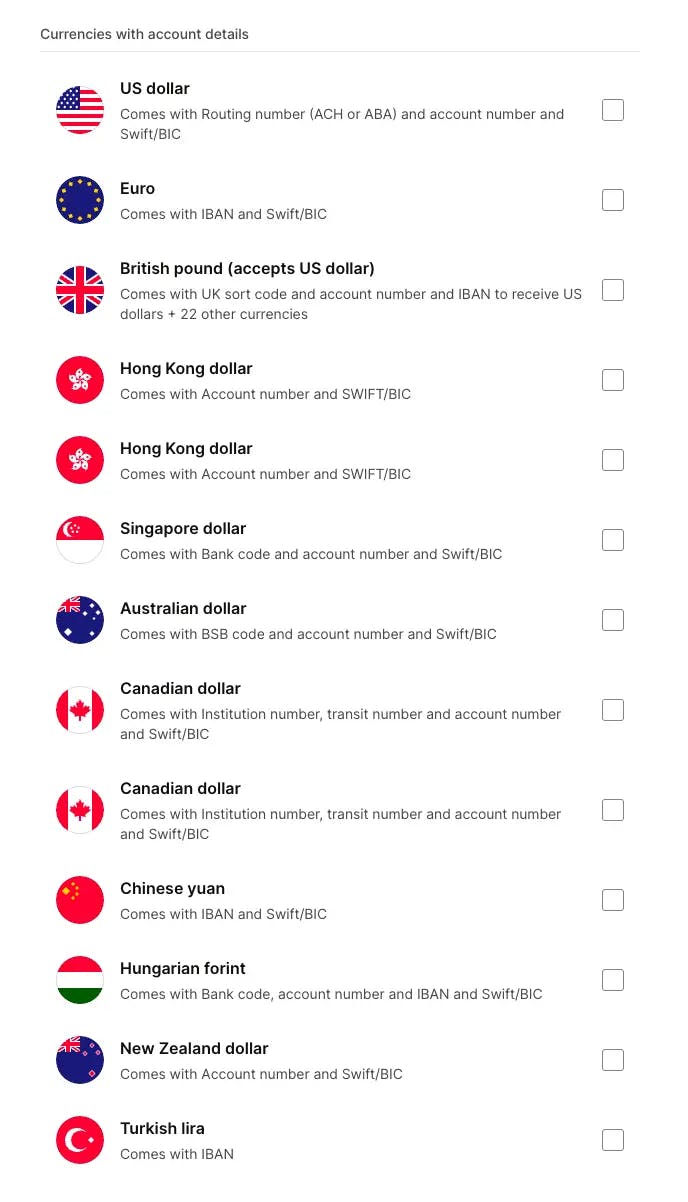
The core of Wise Business is its multi-currency account. You can hold funds in 48 currencies, and for 11 of those, you get local account details, meaning your clients can pay you as if you had a local bank account in their country.

Currencies with local account details (11): USD, EUR, GBP, HKD, SGD, AUD, CAD, CNY, HUF, NZD, TRY

This means, for example, that a Hong Kong-registered business can give US clients an ACH routing number and account number for USD payments, while also providing European clients with a EUR IBAN. A Singapore company could receive SGD locally and pay suppliers in GBP or AUD, all from the same Wise account.

The remaining 37 currencies, including JPY, CHF, THB, MXN, PLN, SEK, NOK, KRW, INR, and many others can be held and converted within your account but cannot receive third-party payments directly.

Wise Business account currencies with local account details showing USD, EUR, GBP, HKD, SGD, AUD, CAD, CNY, HUF, NZD, and TRY with their routing and SWIFT details

International Transfers

Wise supports sending money to over 160 countries. The platform uses the mid-market exchange rate (the rate you see on Google or Reuters) with no markup, you only pay a transparent conversion fee that is shown upfront before you confirm.

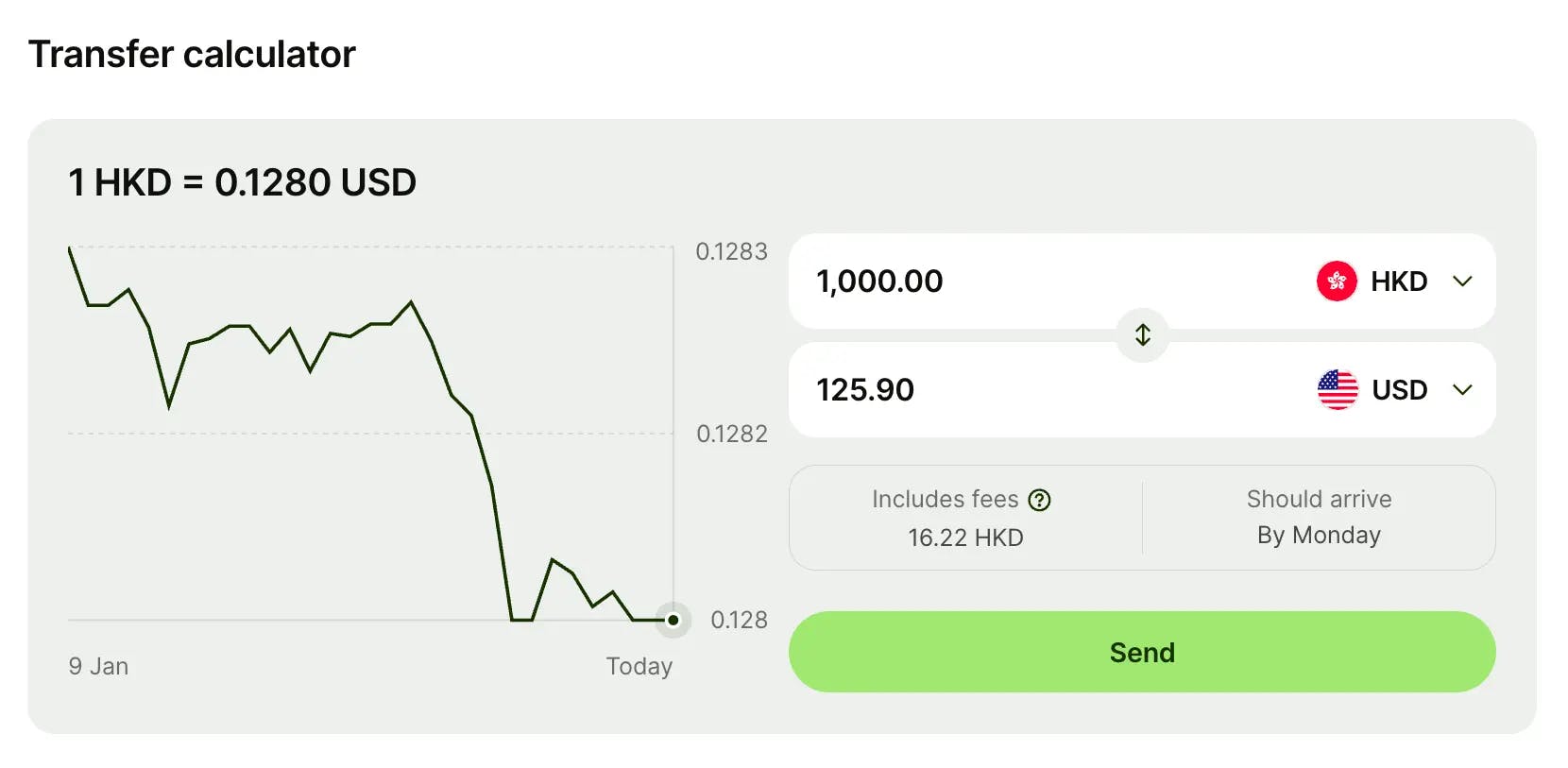
From our dashboard, we can see a live transfer calculator: converting 1,000 HKD to USD shows a fee of 16.22 HKD, with the recipient receiving 125.90 USD. The rate and fee are both visible before confirming.

Wise states that over half of payments arrive within 20 seconds, and 95% are delivered within 24 hours. Delivery times vary depending on the currency corridor and payment method used.

For businesses with multiple payees, whether paying contractors in Southeast Asia, suppliers in Europe, or freelancers across the Americas, batch payments allow you to pay up to 1,000 recipients in a single upload via CSV file.

Wise Business account dashboard with transfer calculator showing HKD to USD conversion fee breakdown

Payment Tools

Wise Business offers a comprehensive set of payment management tools, split between outgoing and incoming payments.

Outgoing payments include scheduled transfers (set a future date), direct debits, bills management (view and pay unpaid bills), batch payments (CSV upload), and recurring card payments.

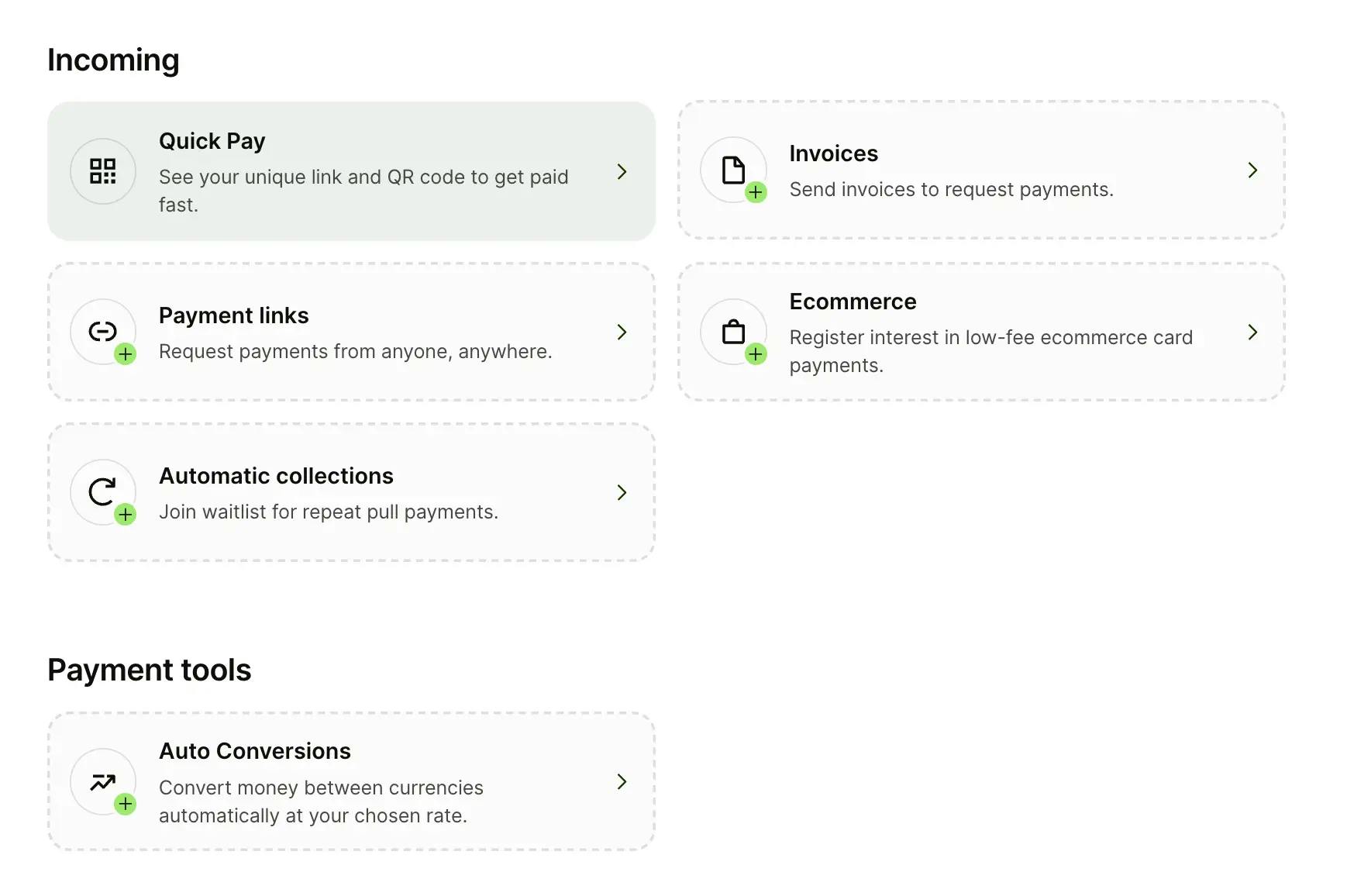
Incoming payments are where things get interesting for businesses that invoice clients internationally. You get Quick Pay (a unique QR code and payment link for instant collection), an invoicing tool to create and send invoices directly from Wise, payment links to request money from anyone, and an ecommerce integration option (currently in registration phase for some regions). Automatic collections and auto conversions are also available, auto conversions let you set target exchange rates and automatically convert when they are hit.

Wise Business account incoming payment features showing Quick Pay, invoices, payment links, ecommerce, automatic collections, and auto conversions

Accounting Integrations

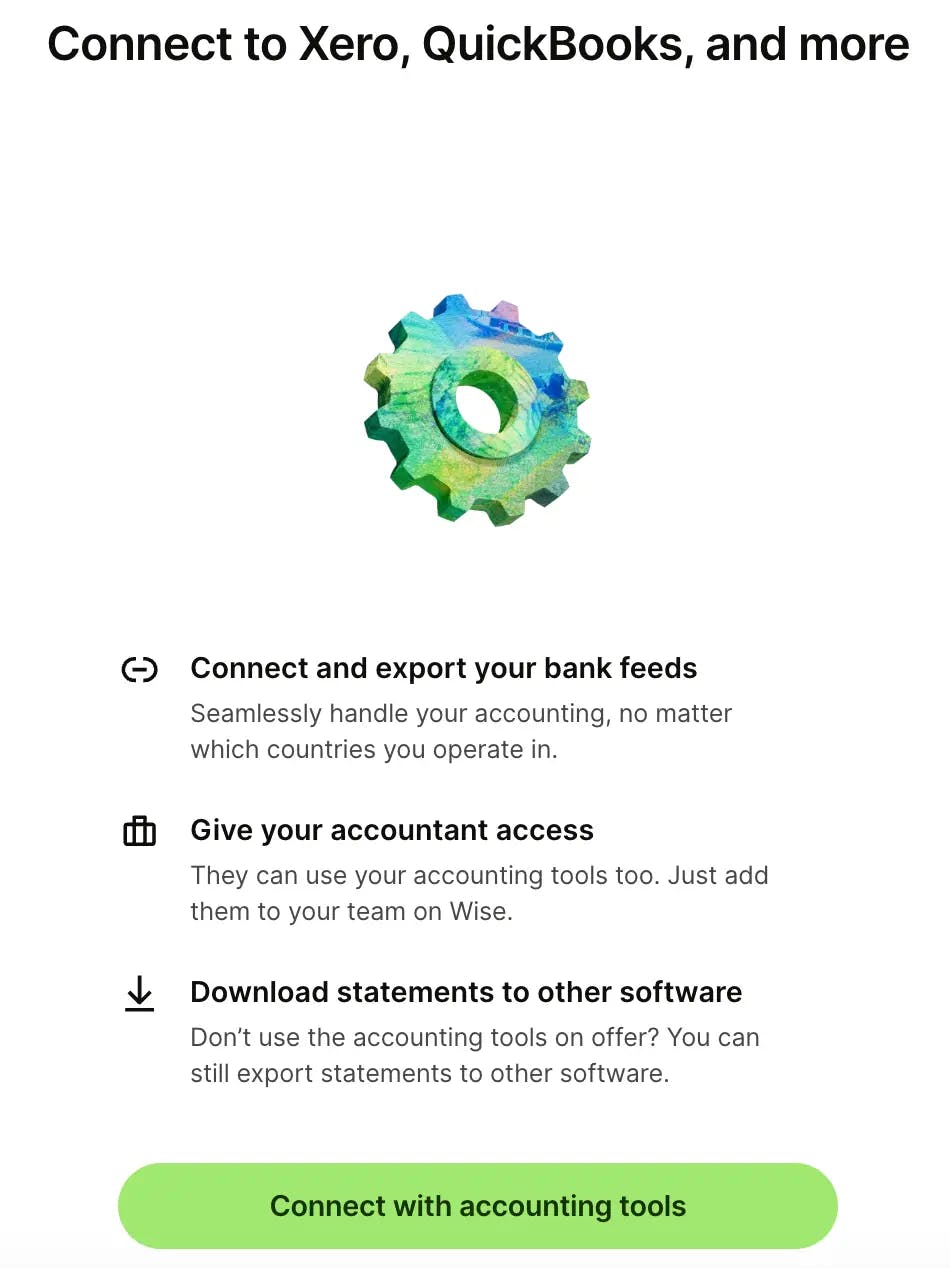
Wise integrates directly with Xero, QuickBooks, and FreeAgent. You can connect your bank feeds so transactions sync automatically, give your accountant direct access to your Wise account (they can use accounting tools without needing full account control), and download statements in formats compatible with other accounting software.

For businesses that manage bookkeeping across multiple currencies, common for companies operating from Hong Kong, Singapore, or the UAE that deal with clients worldwide. This integration can save significant time compared to manually reconciling foreign transactions.

Team & Multi-User Access

You can add team members to your Wise Business account with different permission levels.

This allows you to delegate tasks like making payments, viewing transactions, or downloading statements, without giving everyone full administrative access.

This is a business-only feature (not available on personal accounts) and is included at no extra cost.

Cards (Limited Availability)

Wise offers a business debit card in select countries, allowing you to spend directly from your multi-currency balances at the mid-market rate. Some regions also offer cashback on eligible spending.

Even so, card availability is one area where Wise Business falls short for certain markets. As of February 2026, Wise Business cards are not available in Hong Kong (a waitlist is open) and are also not available for US business accounts.

If your business relies on physical or virtual cards for team spending, this is a meaningful limitation depending on where you operate.

Pricing & Fees

One of Wise's strongest selling points is pricing transparency. There are no monthly fees, no minimum balance requirements, and no hidden exchange rate markups. You pay for what you use.

Pricing Summary

Account openingOne-time ~$31 USD (varies by region)
Monthly fee$0
Minimum balance$0
FX conversionFrom 0.33% (varies by corridor)
USD wire receiving~$6.11
GBP SWIFT receiving~£2.16
EUR SWIFT receiving~€2.39
CAD SWIFT receiving~$10 CAD
Card issuanceSmall one-time fee (where available)
CurrenciesHold 48 / Local details in 11

For the most current fees specific to your country, check Wise's Business Pricing page and select your region.

Fees shown: Hong Kong business profile (verified February 2026). Fees may differ based on your business registration country.

Wise Business FX Fees by Corridor: Real Data from Our Account

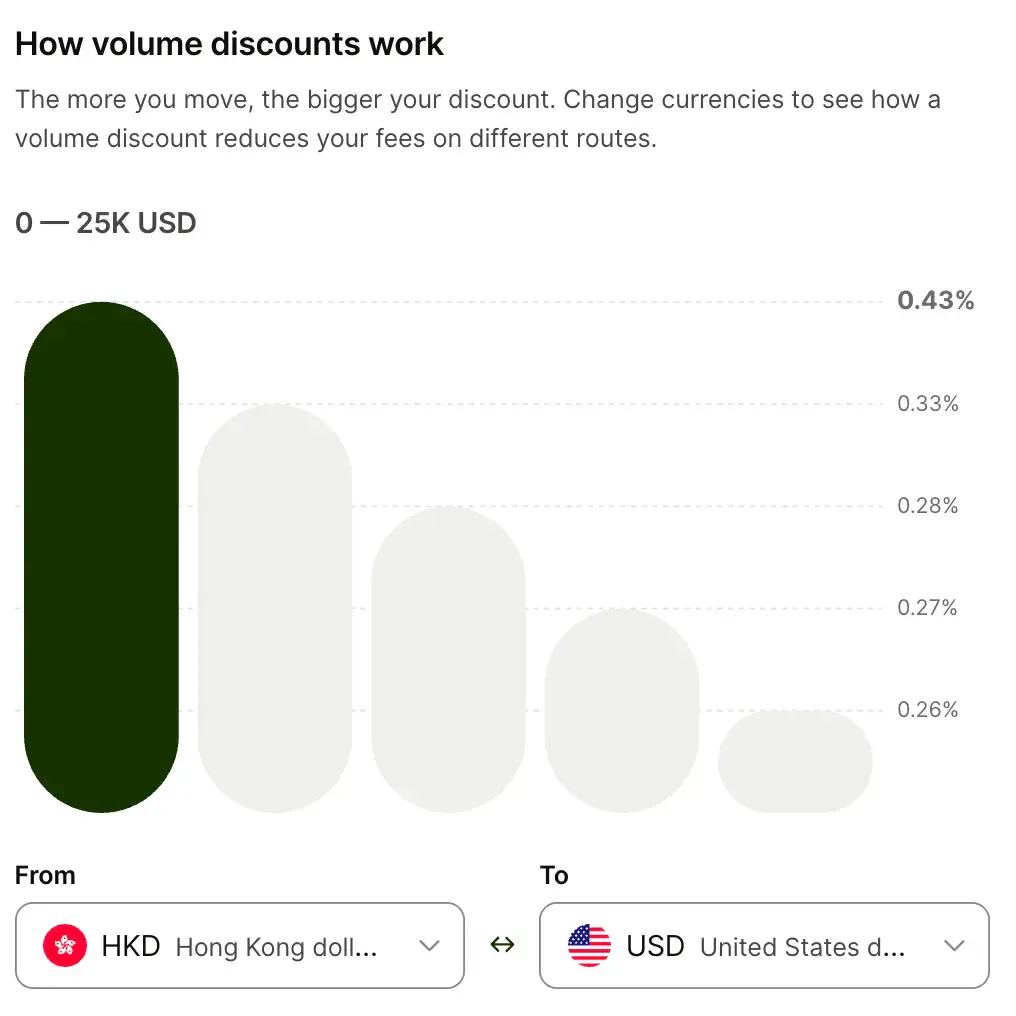
HKD → USD0.43%0.26%
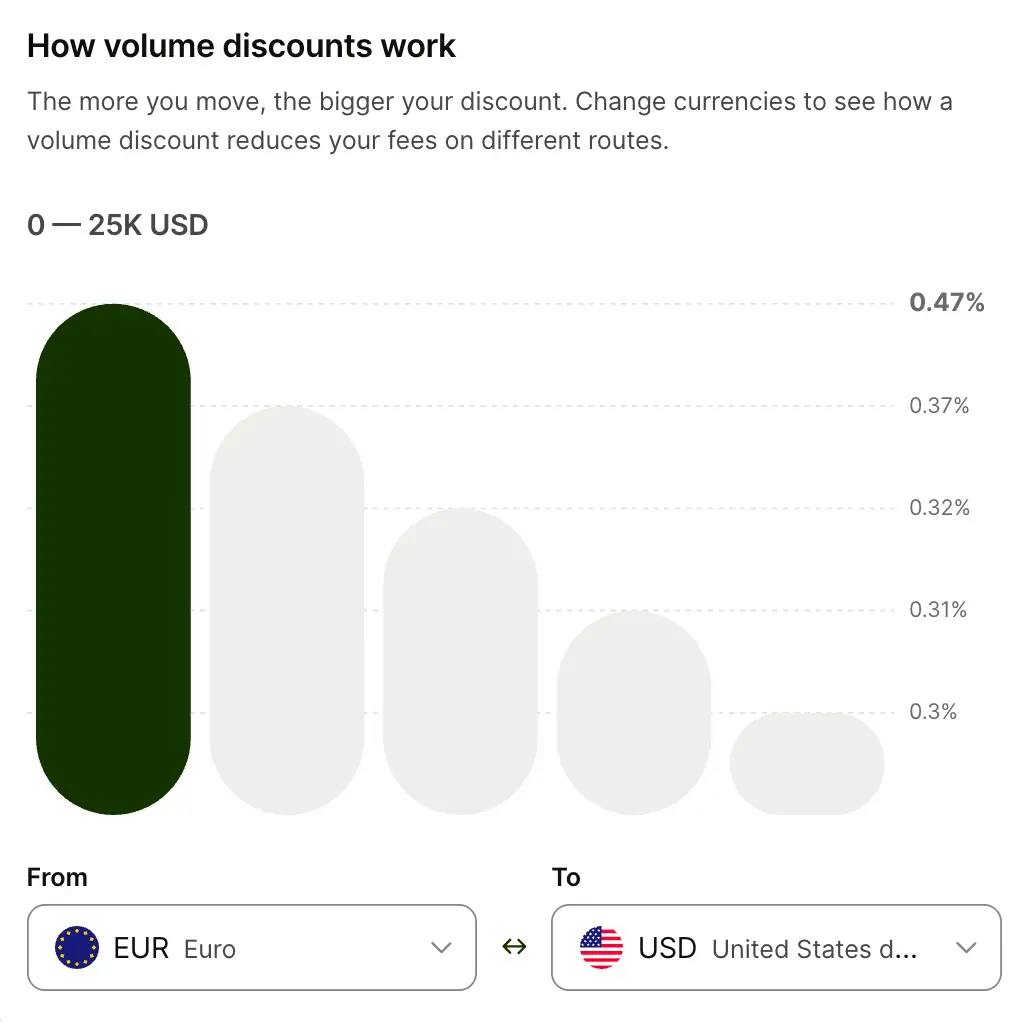
EUR → USD0.47%0.30%
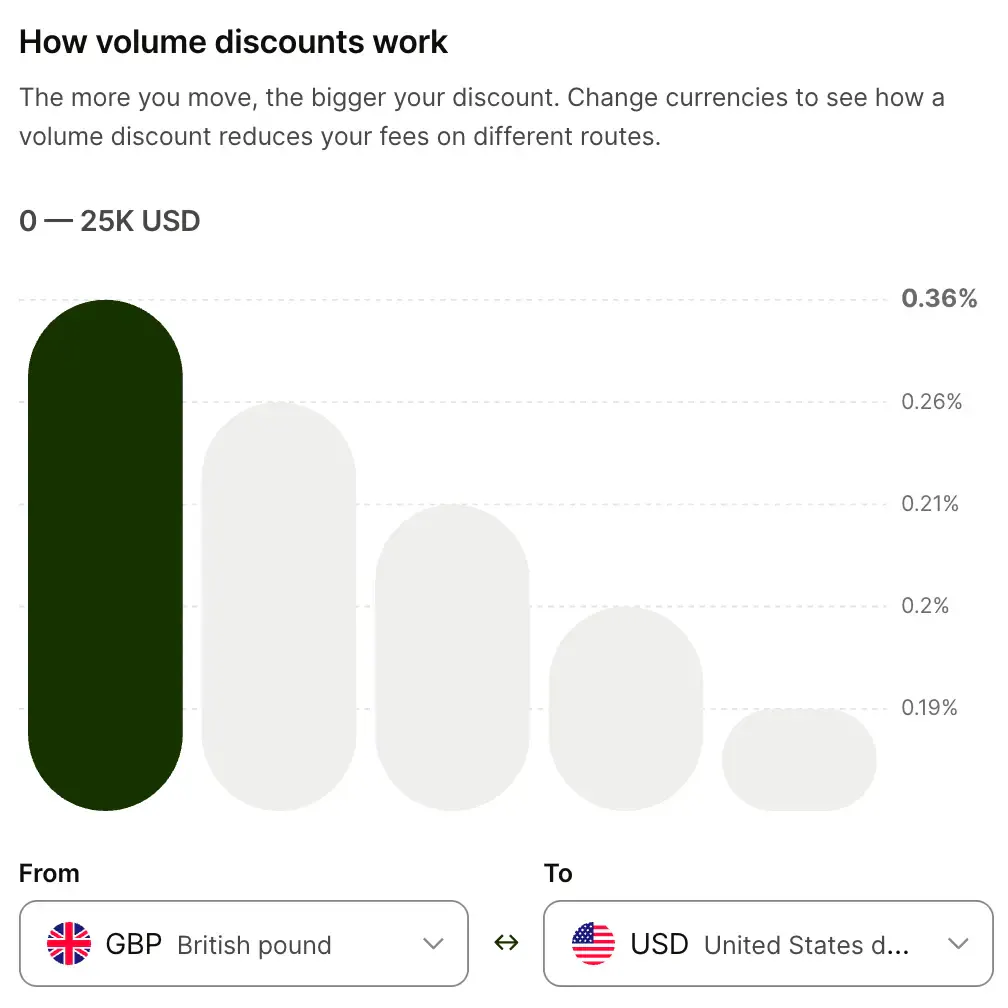
GBP → USD0.36%0.19%
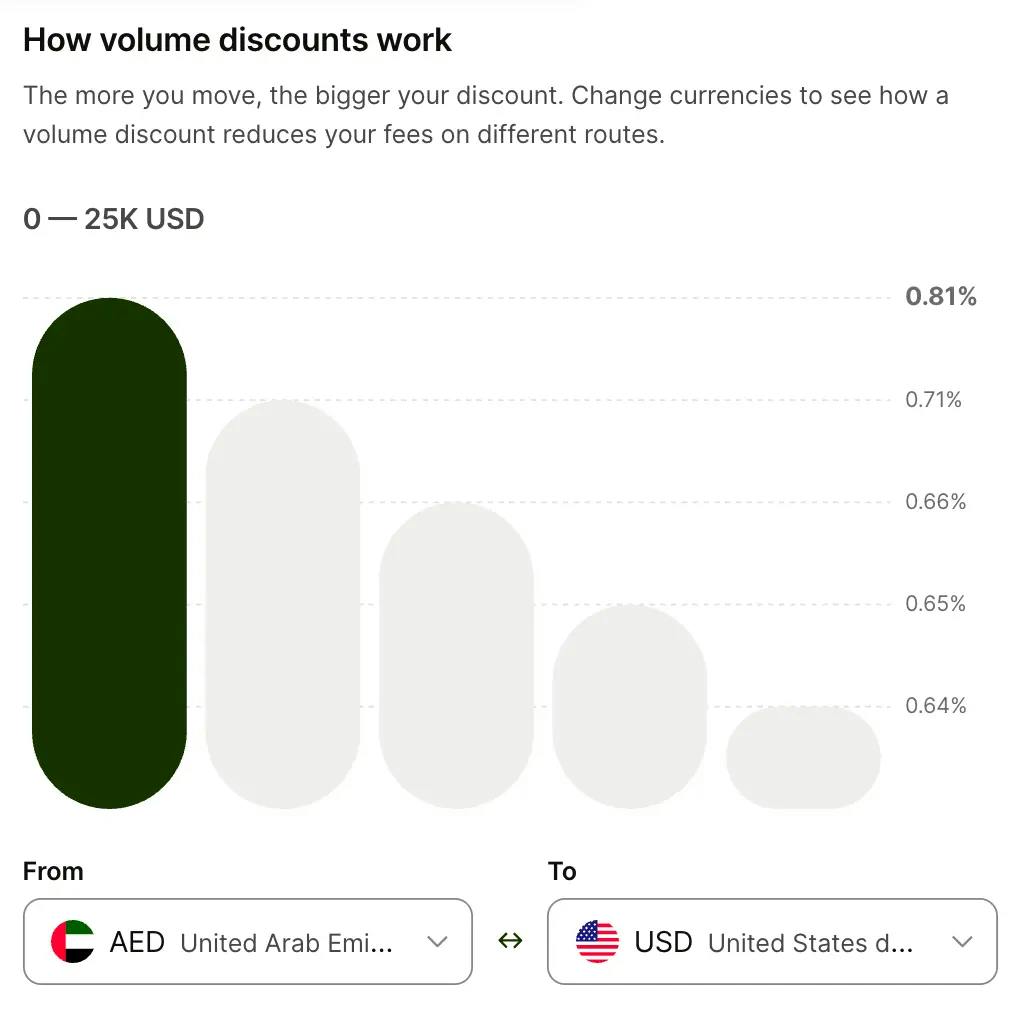
AED → USD0.81%0.64%
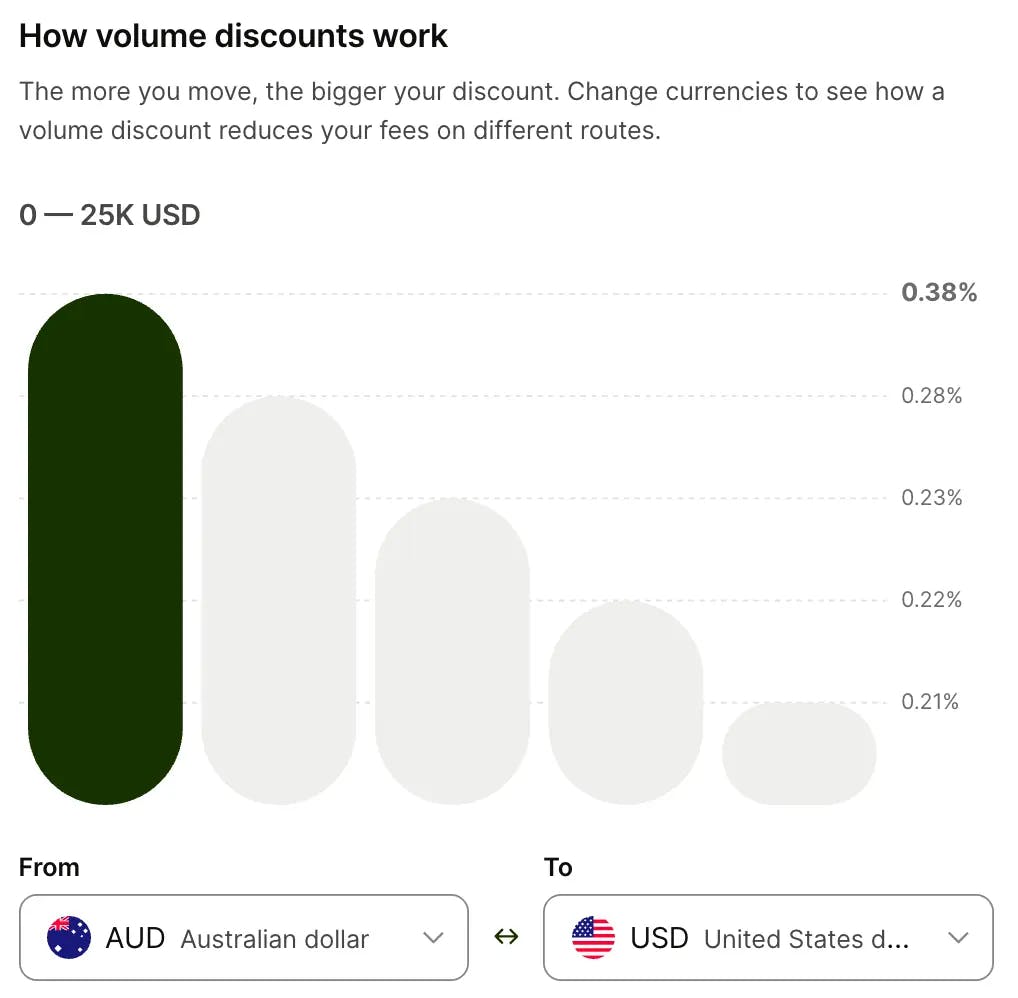
AUD → USD0.38%0.21%
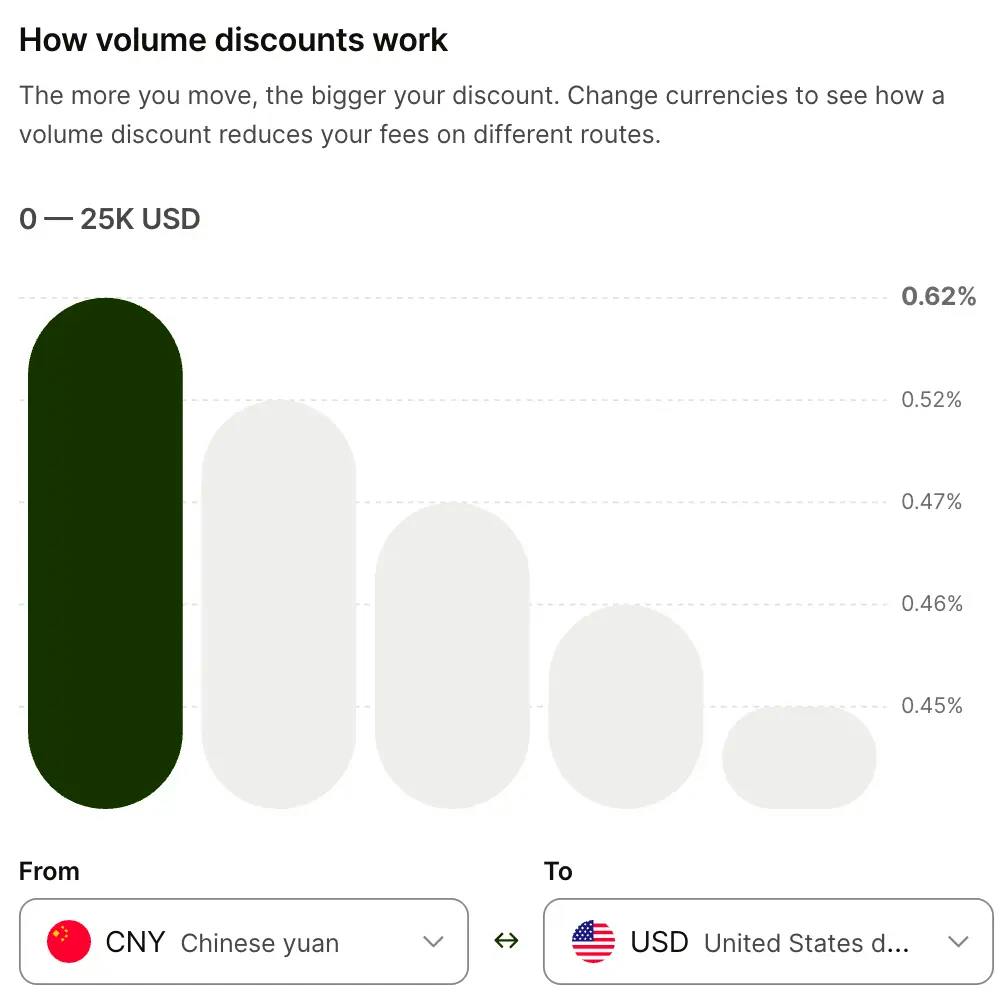
CNY → USD0.62%0.45%

FX fees on Wise are not a flat percentage. They vary depending on which currencies you are converting between. Here is what we see on our Hong Kong profile for conversions to USD:

This is where we can offer something most reviews cannot, actual fee data from our own Wise Business account, captured in February 2026.

How to Open a Wise Business Account

We opened a Wise Business account for our Hong Kong limited company in February 2026. The entire process was completed online: no branch visit, no paper forms, no notarised documents.

Before you start the application, make sure you have the documents below ready. Exact requirements vary by country and business type, but Wise Business collects everything during the online application there are no separate submission steps or branch visits.

Checklist

Requirements: Documents Checklist
0 of 7 completed0%

Step-by-Step Setup

  1. 1
    Create your account

    Go to wise.com and register with your email address, or sign up using Google. This creates your Wise Business login.

  2. 2
    Choose account type

    Select "Business account." You can always add a personal account later if needed, the two are separate.

  3. 3
    Select your business location

    Choose the country where your business is officially registered. This is important because it determines which features and fee structures will be available to you.

  4. 4
    Phone verification

    Enter your phone number for two-factor authentication. Wise sends an SMS code to verify. The country code is auto-detected based on the location you selected.

  5. 5
    Define your role

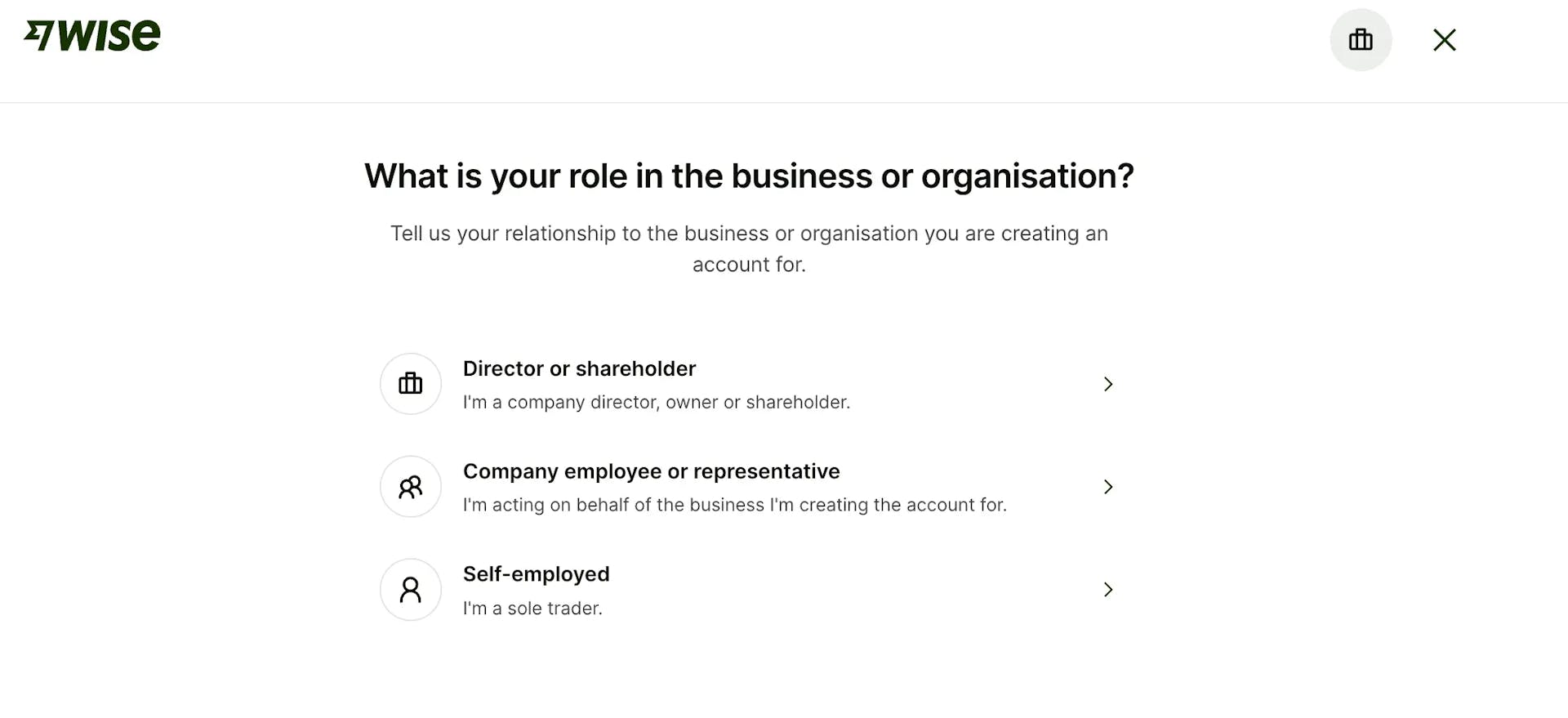
    Tell Wise how you relate to the business: director or shareholder, company employee or representative, or self-employed. This determines what identity verification steps you will need to complete.

  6. 6
    Enter business details

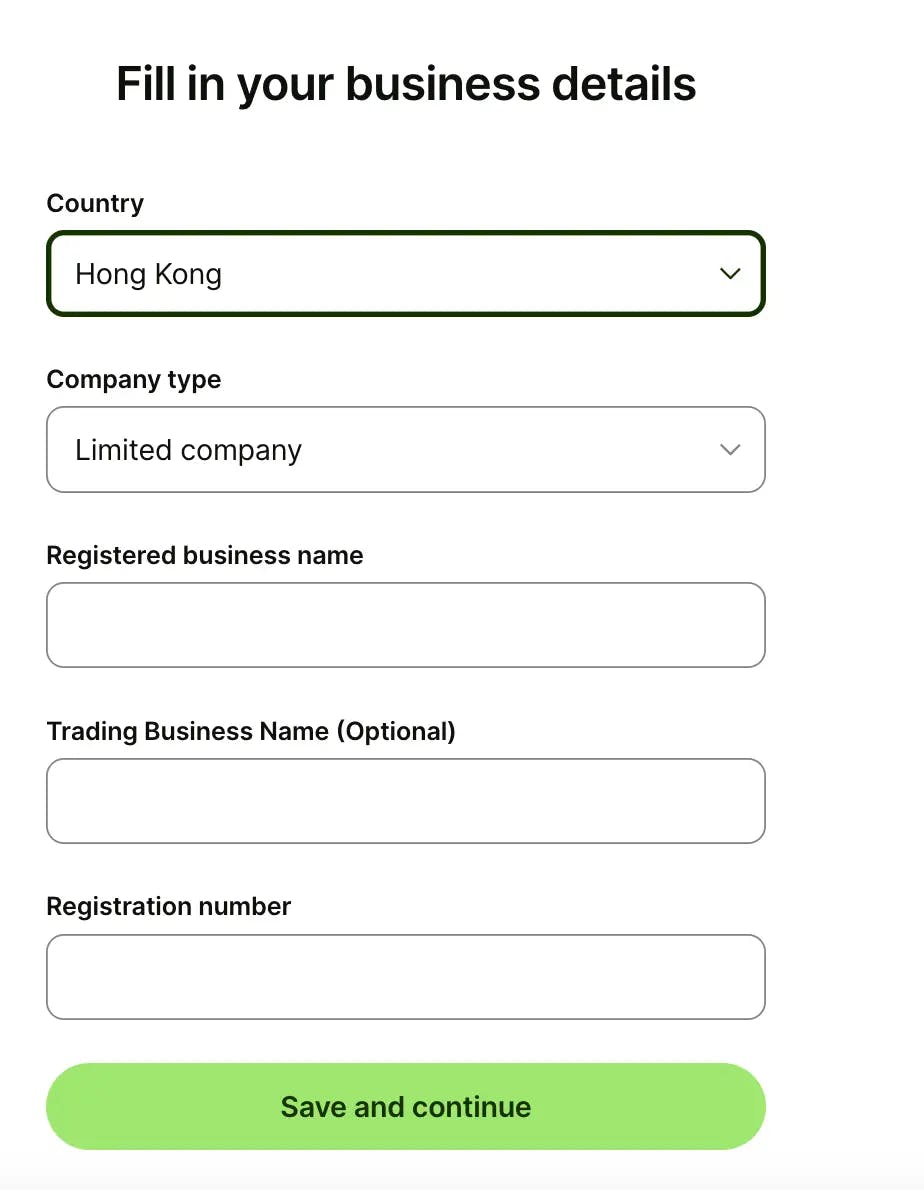
    Fill in your company's country of registration, company type (limited company, partnership, sole trader, etc.), registered business name, optional trading name, and registration number. Everything must match your official government records precisely, any discrepancy can delay verification.

  7. 7
    Confirm registered address

    This is the address your business used when registering with the government (for example, the Companies Registry in Hong Kong). It should match what appears on your Certificate of Incorporation or equivalent document.

  8. 8
    Enter your personal address

    Your residential address, where you live most of the time. Wise may request proof of address at a later stage.

  9. 9
    Select business industry

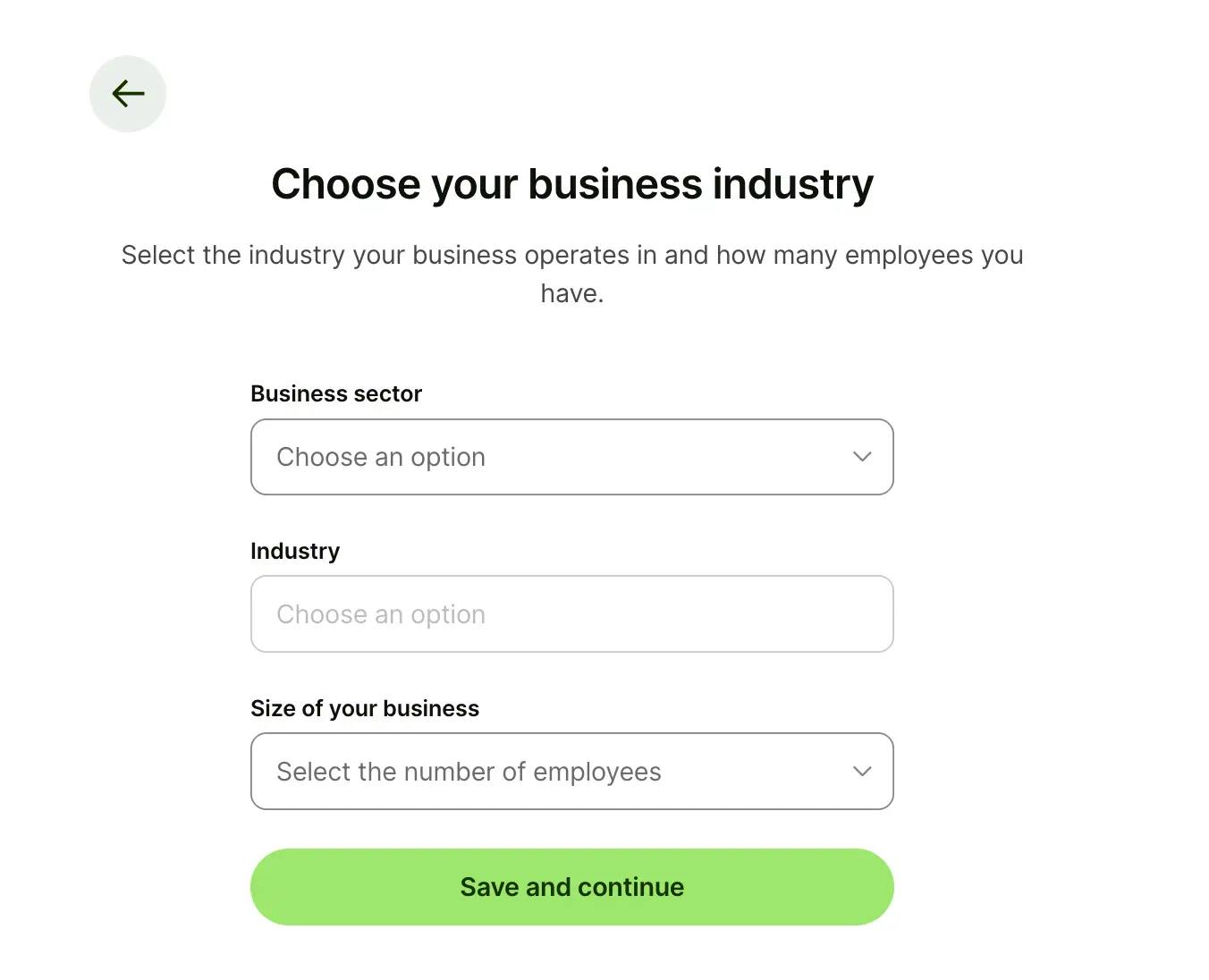
    Choose your business sector, specific industry, and company size from the dropdown menus. Be accurate here, inconsistencies between your industry selection and your actual business activity can trigger additional compliance reviews.

  10. 10
    Describe your business

    This is a free-text field where you explain what your company does. Think of it like writing a professional "About Us" summary: what services or products you offer, who your clients are, and how the business generates revenue. Be clear and factual. Vague or generic descriptions can slow down the verification process.

  11. 11
    Provide your website or online profile

    Wise asks for a link to your business website, social media profile, or e-commerce store. This step is optional, there is an option to indicate you do not have an online presence, but providing a link significantly helps verification. It gives Wise a way to confirm that your business activity matches what you described.

  12. 12
    Business verification

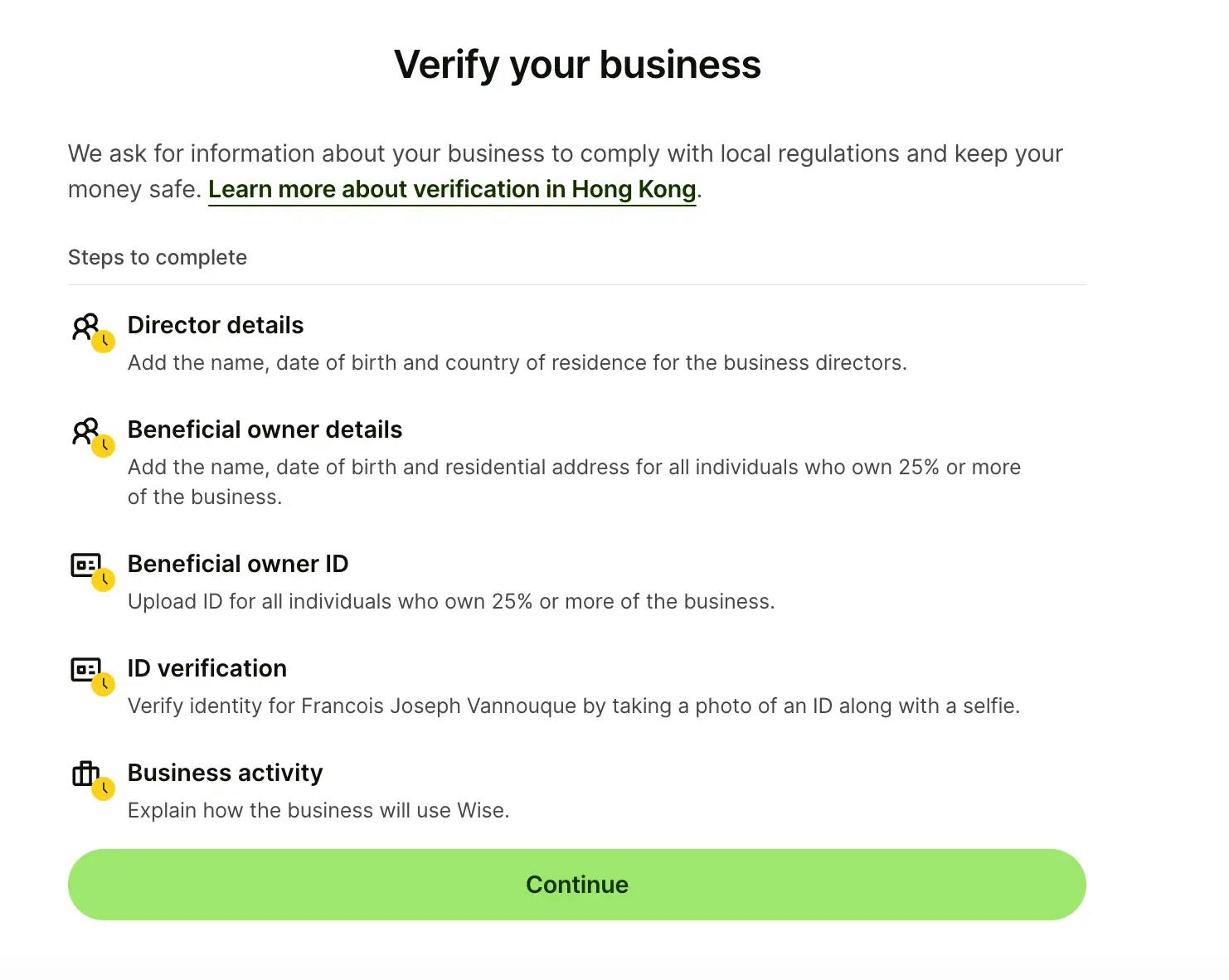
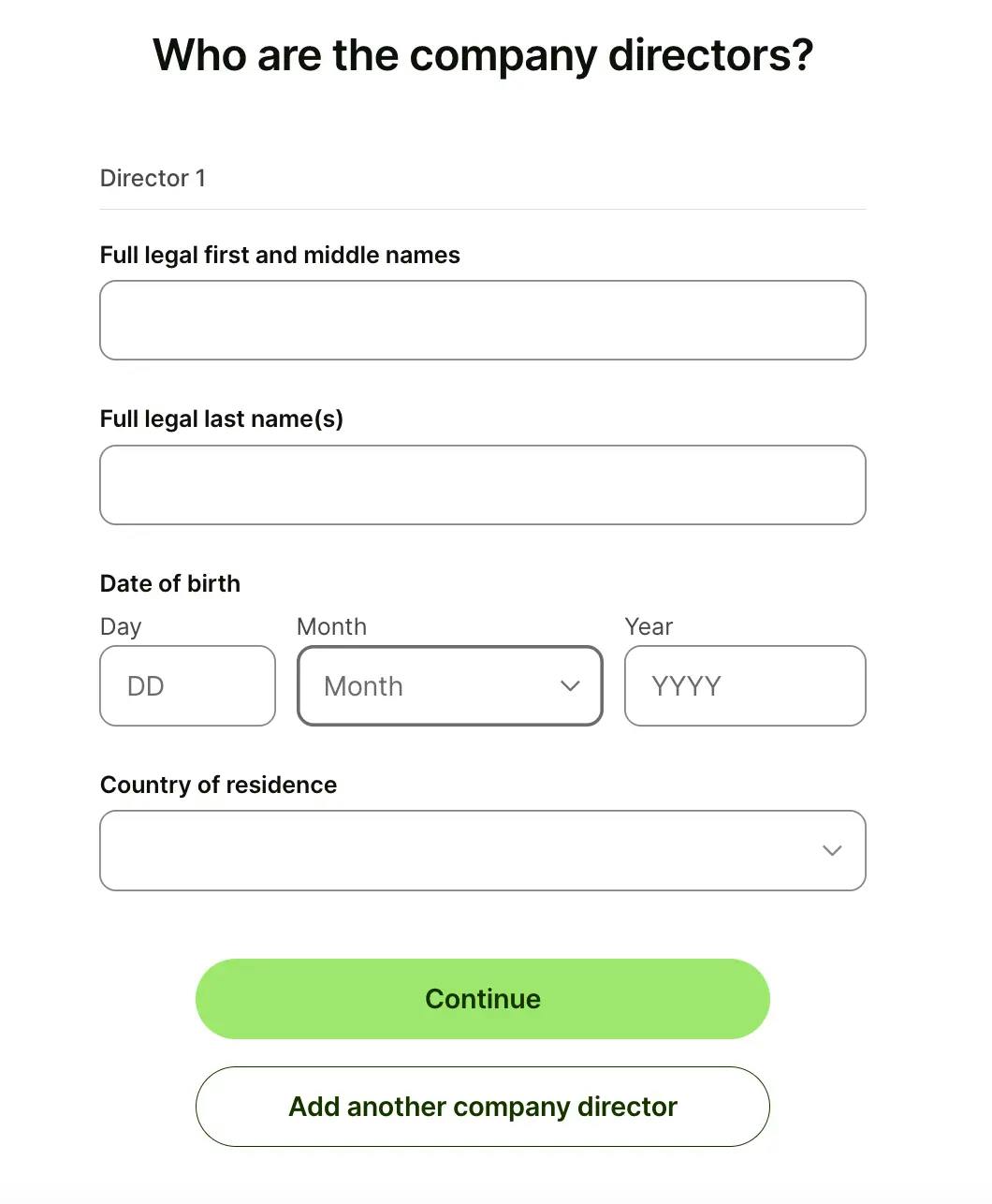
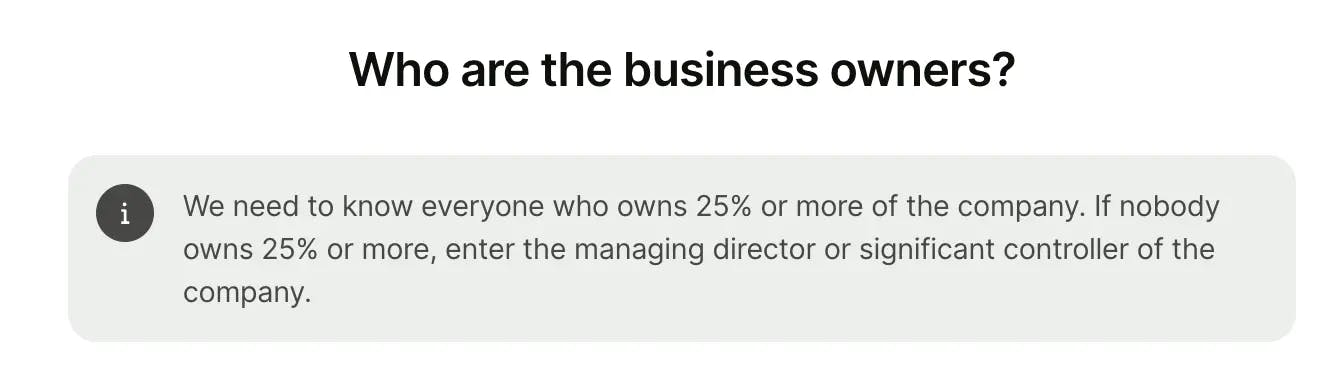
    This is the most involved step. You will need to provide director details (name, date of birth, country of residence), information about beneficial owners (anyone owning 25% or more), upload a photo ID for each beneficial owner, complete identity verification yourself (photo of your ID plus a selfie, done via smartphone), and confirm your business activity. Wise may prompt you to switch to your phone for the ID verification step.

  13. 13
    Select currencies

    After verification is submitted, you can choose which currencies to activate. Eleven currencies come with local account details (USD, EUR, GBP, HKD, SGD, AUD, CAD, CNY, HUF, NZD, TRY). You can add additional currencies at any time after your account is verified.

  14. 14
    Wait for verification

    Wise reviews your application and supporting documents. For straightforward business structures (single director, clear ownership, standard industry), verification can be completed within a few days. More complex setups, multiple jurisdictions, unusual ownership structures, or high-risk industries, may take longer.

  15. 15
    Pro tip

    Have all your documents and information ready before you start the application. With everything prepared, the actual form takes about 15 to 20 minutes to complete. The majority of the waiting time is in the verification stage, not the application itself.

Availability & Feature Differences by Country

Wise Business is available in most major markets, but feature availability varies depending on where your business is registered. This is one of the most important things to understand before opening an account.

Wise generally bases feature availability on your business registration country, and may also consider where you operate and where directors reside. If there is a mismatch between these locations, the available feature set may be more limited.

Feature availability also changes over time, Wise Business regularly rolls out new features in additional markets. Check wise.com for the most current information specific to your country.

Comparison Matrix

Multi-currency account
Local account details
Business debit cardVaries
Wise InterestVariesVaries
Batch payments
Invoicing
Accounting integrations

Compliance, Limits & Common Verification Issues

Wise takes KYC (Know Your Customer) and AML (Anti-Money Laundering) compliance seriously. This is generally a positive signal, it means the platform is well-regulated and working to prevent fraud. But it also means you should be prepared for thorough verification and occasional compliance-related friction.

Based on our experience and patterns reported by other users, the following situations can trigger additional compliance reviews or delays:

Inconsistencies between your business description and actual activity. If you describe your business as an e-commerce retailer but your website shows consulting services, expect questions. Make sure everything aligns.

High-risk industries. Businesses in sectors like cryptocurrency, gambling, adult content, or certain financial services may face additional scrutiny or may not be eligible for a Wise account.

Sudden volume changes. If your account has been relatively quiet and you suddenly process a large transaction, Wise may flag it for review. The best approach is to scale gradually and let your transaction history build naturally.

Missing or incomplete online presence. A website, LinkedIn profile, or other online footprint helps Wise verify your business. Accounts without any online presence may face longer verification times.

Complex ownership structures. Multi-jurisdictional companies, trusts, nominee arrangements, or businesses with many layers of ownership can require more documentation and review time.

Transfer limits vary by country and verification level. Wise does not publish a single global limit, it depends on your specific account profile.

On review platforms, some users report occasional account holds or restrictions during compliance reviews, sometimes with limited explanation from Wise support. This appears to be more common among newer accounts, businesses in less common industries, or accounts processing large volumes early on.

How to minimise issues: Be completely transparent about your business activity from day one. Ensure your business description, website, and industry selection all tell a consistent story. Start with smaller volumes and scale up. Keep your business documentation current. And respond quickly to any requests from Wise compliance, delays on your end can extend the review period significantly.

Pros & Cons

Pros
  • Transparent FX pricing

    The mid-market exchange rate with no markup is rare among financial service providers. You see the exact fee before confirming any conversion or transfer.

  • No monthly fees

    You only pay when you actually use the service, no subscription, no minimum balance requirements, no inactivity charges.

  • Fast international transfers

    Wise states that most payments arrive within 24 hours, with many completing in seconds depending on the corridor.

  • Hold 48 currencies, local details in 11

    Broad multi-currency coverage that allows you to receive payments locally in major markets without maintaining separate bank accounts.

  • 100% online onboarding

    No branch visits, no appointment bookings, no paper forms. The entire setup process is digital.

  • Strong accounting integrations

    Direct connections to Xero, QuickBooks, and FreeAgent, plus bank feed exports and accountant access.

  • Multi-user team access

    Add team members with different permission levels at no extra cost.

  • Batch payments

    Pay up to 1,000 recipients in a single upload, valuable for businesses with international payroll or multiple suppliers.

Cons
  • Not a bank

    No loans, overdrafts, credit facilities, cash deposits, or cheque handling. If you need any of these, you need a traditional bank alongside Wise.

  • No deposit insurance

    Because Wise is an EMI, your funds are safeguarded but not covered by FSCS, FDIC, or equivalent deposit protection schemes.

  • Cards not available everywhere

    As of February 2026, business debit cards are not available in Hong Kong or the US. This may change, Wise Business has a waitlist for HK but it is a current gap.

  • Compliance can feel opaque

    When account reviews happen, some users report limited communication about what triggered the review or how long it will take to resolve.

  • Self-service support model

    There is no dedicated account manager. Support is primarily through the help centre, with chat and email available in some cases. Response times and available channels vary by region.

  • Features vary by country

    What you can do with Wise Business depends on where your company is registered. Cards, interest, and certain payment tools are not available in all markets.

  • No interest in all regions

    Wise Interest (earning returns on held balances) is available in select countries only, not yet in Hong Kong as of February 2026.

Wise Business vs Traditional Banks

Wise and a traditional bank serve fundamentally different purposes, and understanding this prevents frustration.

Where Wise excels: Transparent foreign exchange with no spread markup. Fast online onboarding (minutes, not weeks). Multi-currency management in a single account. No minimum balance fees. Batch payments and API access for automation.

Where traditional banks are necessary: Credit facilities, business loans, and overdrafts. Cash deposits and cheque handling. Trade finance and letters of credit. Physical branch access for in-person banking. Deposit protection under FSCS, FDIC, or equivalent schemes.

Our recommendation is straightforward: use both. Open a Wise Business account for your international payments, currency conversions, and receiving money from overseas clients. Maintain a traditional bank account for credit needs, local operations, and as your primary deposit-protected account. The two complement each other well, and many businesses operating internationally find this dual setup to be the most practical arrangement.

Related Provider Reviews

If you are evaluating multiple options for your international business finances, these reviews may also be helpful:

  • Payoneer Setup Review: A detailed look at opening and configuring a Payoneer account, including marketplace integrations and mass payout features.
  • Payoneer Interface Review: A walkthrough of Payoneer's dashboard, payment tools, and day-to-day management features.

Hong Kong Business Banking Guide: Our comprehensive comparison of business banking options in Hong Kong, covering traditional banks, digital alternatives, and requirements for non-residents.

Frequently Asked Questions