Menu
Hands-On Review

Aspire Business Account Review 2026: Singapore & Hong Kong Companies Tested With Real Dashboard Screenshots

Is Aspire the right financial platform for your Singapore or Hong Kong company?

A detailed walkthrough of every Aspire feature based on real interface screenshots. No fluff, no affiliate bias, just an honest breakdown of what you get when you open an Aspire account.

Multi-currency accounts in 13 currencies (USD, EUR, GBP, HKD, SGD, CNY, and more)
Corporate cards with budget controls
Built-in invoicing and bill management
New: Employer of Record starting at $399/month
GrowAcross TeamPublished
12 min readLast updated
Aspire_EMI

Aspire

Trustpilot
3.9(151 reviews)View →
Users praise

Reviewers consistently praise the quick, frictionless onboarding ("got my account approved and could get started with ease"), the clean and intuitive UX ("easy to use, neat interface"), and responsive human customer service available 7 days a week. First-time founders particularly appreciate the zero-paperwork digital process compared to traditional banks.

Common complaints

Several users report sudden account closures or fund holds with limited communication. One reviewer had their account closed and funds unreleased for months with no email response. Another had regular payments flagged as "high risk" after 2 years without explanation or appeal process, forcing them to update all client invoices with new bank details.

Ratings from Trustpilot and Google Reviews as of January 2026. Ratings are indicative and may vary by region or over time.Updated Jan 2026.

What is Aspire Singapore?

Aspire is a Singapore-headquartered fintech platform offering business accounts and all-in-one financial management for companies across Southeast Asia. Founded in 2018, Aspire's business account has become a popular alternative to traditional banks for startups and SMEs in Singapore, Hong Kong, Indonesia, and Thailand.

Rather than just holding your money, Aspire combines multi-currency account management, expense tracking, invoicing, bill payments, corporate cards, and payroll into a single platform. For founders who don't want to juggle multiple tools, this integration can be a significant time-saver.

The platform is designed with a modern, clean interface that feels more like a consumer fintech app than legacy banking software. Everything is accessible from a single dashboard, and most actions can be completed in a few clicks.

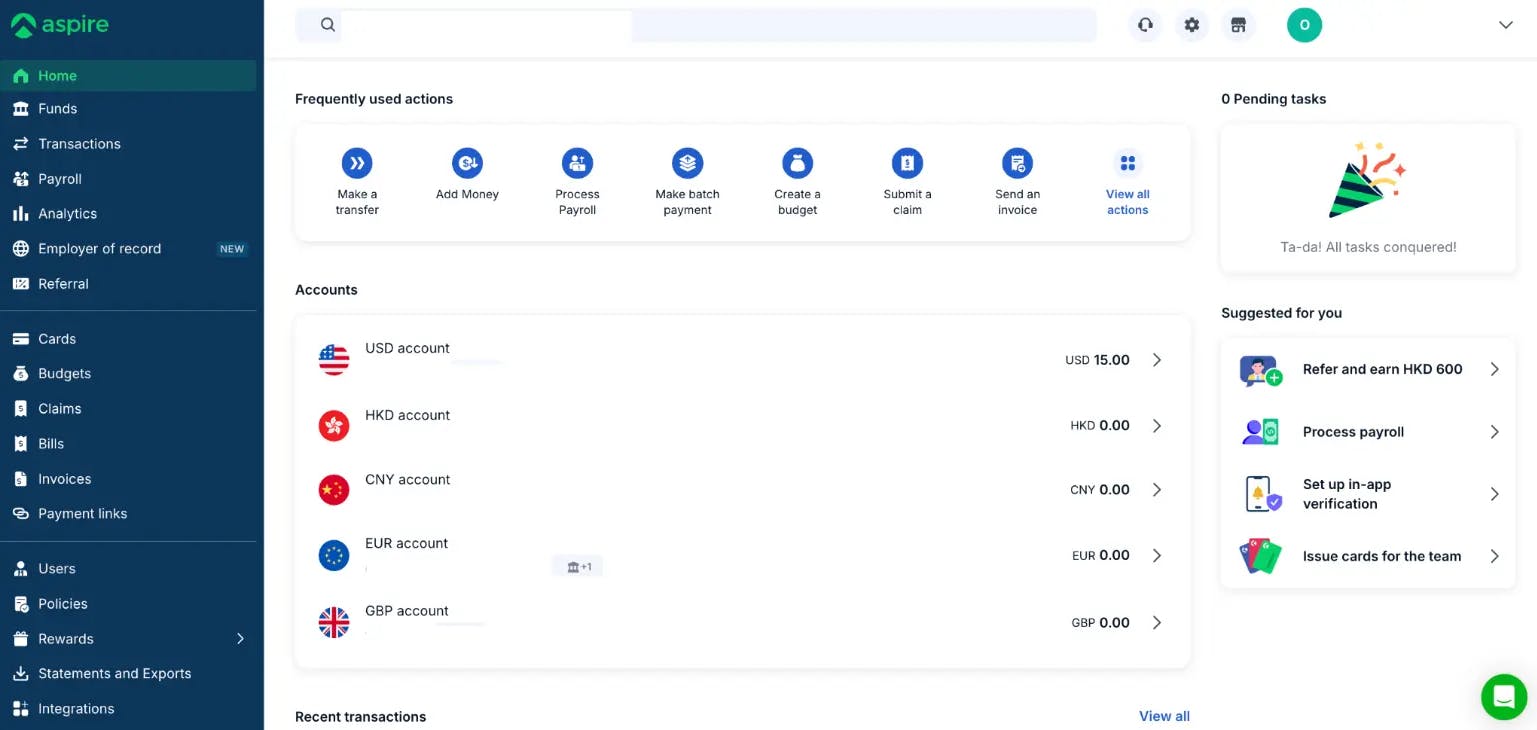
Aspire business account dashboard showing multi-currency accounts

Aspire Multi-Currency Business Accounts

One of Aspire's strongest features is its multi-currency account system. When you open an Aspire account, you get access to 13 currency wallets. Local account details (IBAN, routing numbers) are available for major currencies including USD, EUR, GBP, HKD, and SGD.

Each currency account comes with its own local account details, which is crucial for receiving international payments. For example, your EUR account includes a GB-based IBAN (starting with GB47TCCL...), allowing you to receive SEPA transfers from European clients as if you had a European bank account. Similarly, your USD account comes with a US routing number for ACH transfers.

This setup solves a common pain point for international businesses: receiving payments in multiple currencies without losing money on conversions. Instead of having clients send USD to your HKD account (and paying conversion fees twice), they can send directly to your USD wallet.

The interface clearly shows each account's balance, and you can drill down into any account to see transaction history, filter by date, and categorize expenses. The "Exchange currency" feature lets you convert between your Aspire wallets when you need to consolidate funds.

Transfers & Payments

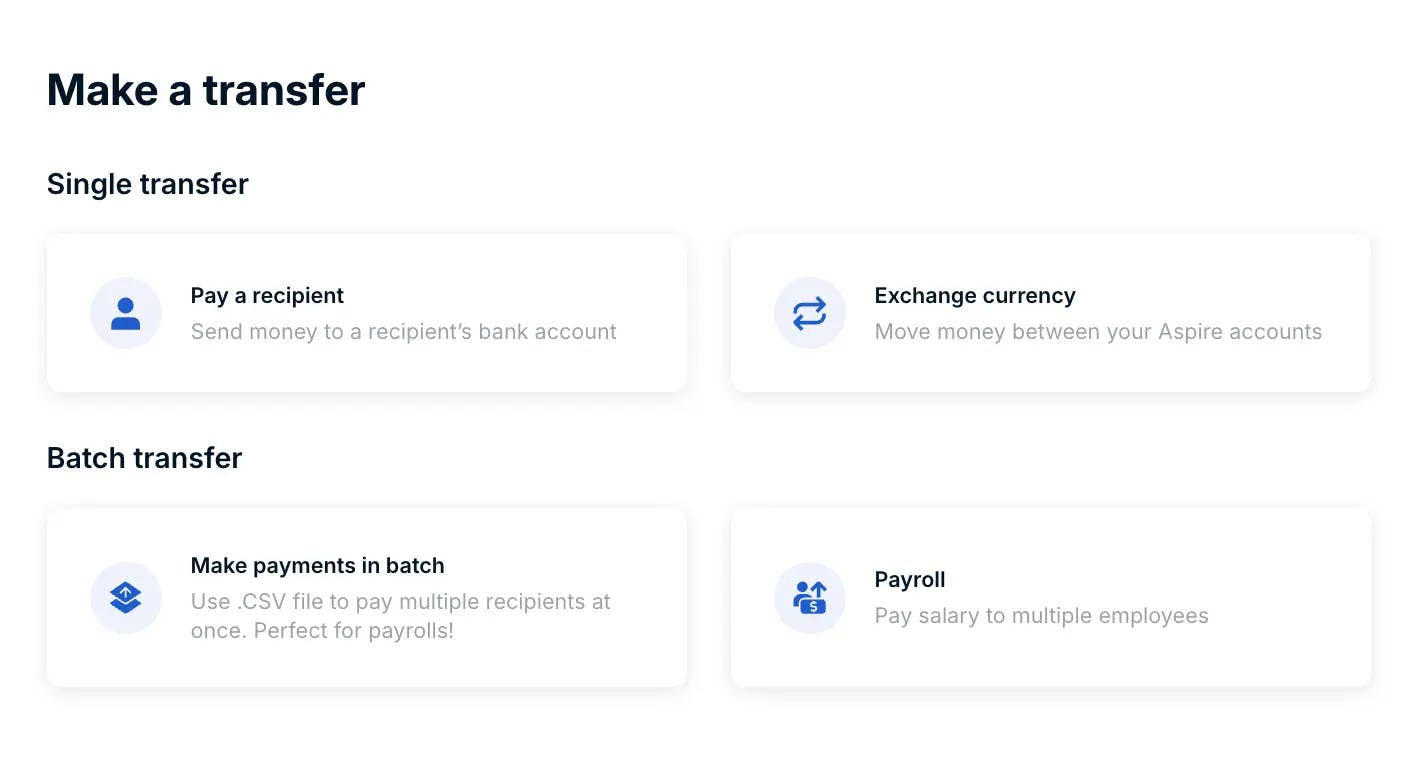
Aspire offers flexible options for sending money, organized into two categories: single transfers and batch transfers.

Single Transfer includes two options. "Pay a recipient" lets you send money to any bank account worldwide, this is your standard international or domestic transfer. "Exchange currency" allows you to move money between your own Aspire currency wallets, useful when you need to convert USD earnings to HKD for local expenses.

Batch Transfer is where Aspire shines for growing teams. "Make payments in batch" lets you upload a CSV file with multiple recipients and pay them all at once. This is perfect for paying multiple suppliers or contractors simultaneously. The dedicated "Payroll" option takes batch payments further with features specifically designed for salary payments.

Aspire transfer interface with single and batch payment options

Corporate Cards

Aspire lets you issue corporate cards to your team members with granular spending controls. Unlike traditional corporate cards that require credit checks and personal guarantees, Aspire cards are tied to your account balance, you can only spend what you have.

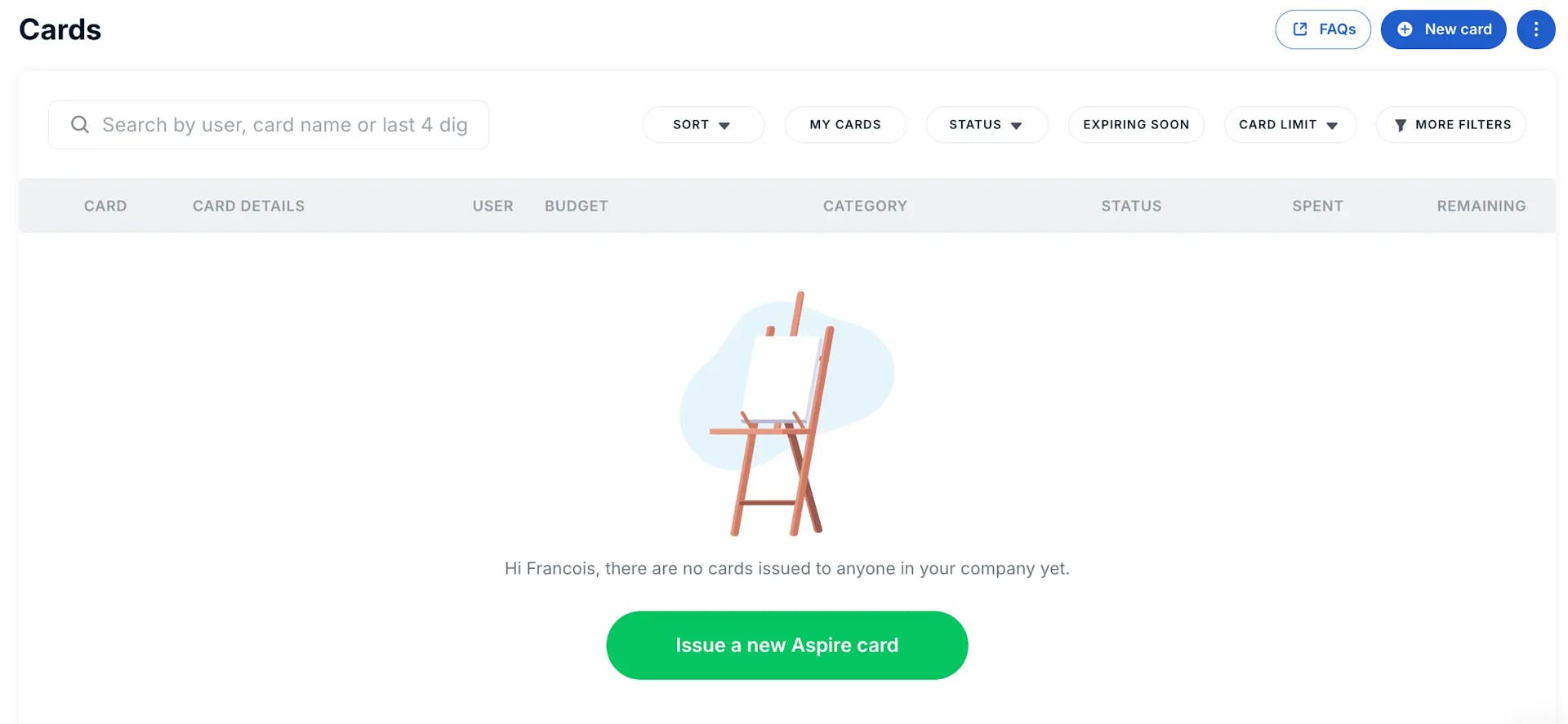
The Cards dashboard shows all issued cards across your organization with key information at a glance: card details, assigned user, linked budget, category, status, amount spent, and remaining limit. Filters let you quickly find cards by status, expiration date, or spending limit.

Cards can be physical (first card free per user, shipped to your address) or virtual (instant issue for online purchases). Virtual cards are particularly useful for managing subscriptions, create a dedicated card for each SaaS tool, set a limit, and never worry about surprise charges.

Virtual Cards for Subscriptions

Create a separate virtual card for each SaaS subscription. If a service gets compromised or tries to overcharge, you can freeze just that card without affecting your other payments.

Aspire corporate cards dashboard with spending controls

Invoicing

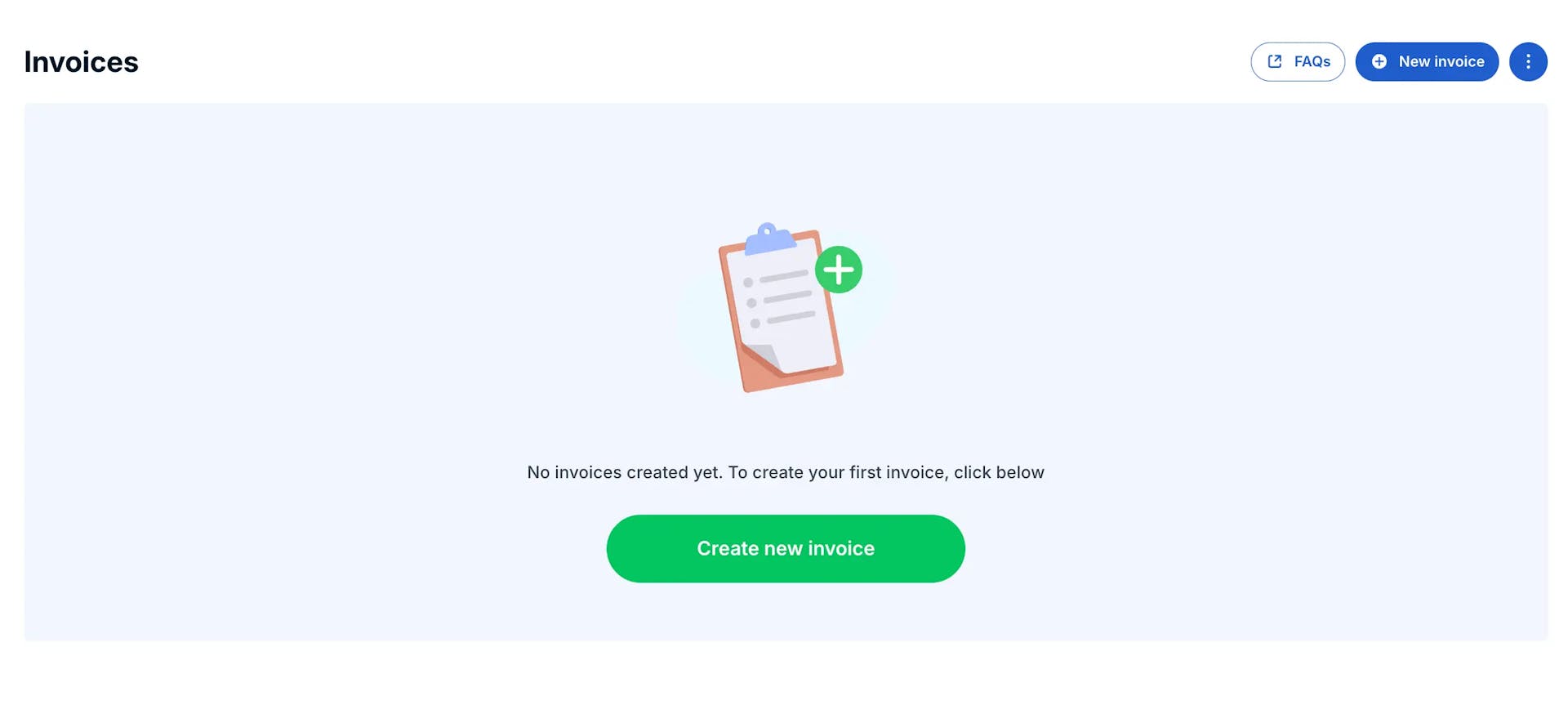
Aspire includes a built-in invoicing system that lets you create, send, and track invoices without needing separate software like FreshBooks or Wave.

The invoicing module offers three core capabilities. First, you can create and send invoices directly from the platform, either by building a new invoice from scratch or uploading an existing one. Second, Aspire provides automatic reconciliation: when a payment comes in, the system attempts to match it to outstanding invoices. Third, you get invoice status tracking so you always know which invoices are paid, pending, or overdue.

Aspire invoicing module with reconciliation features

Bills Management

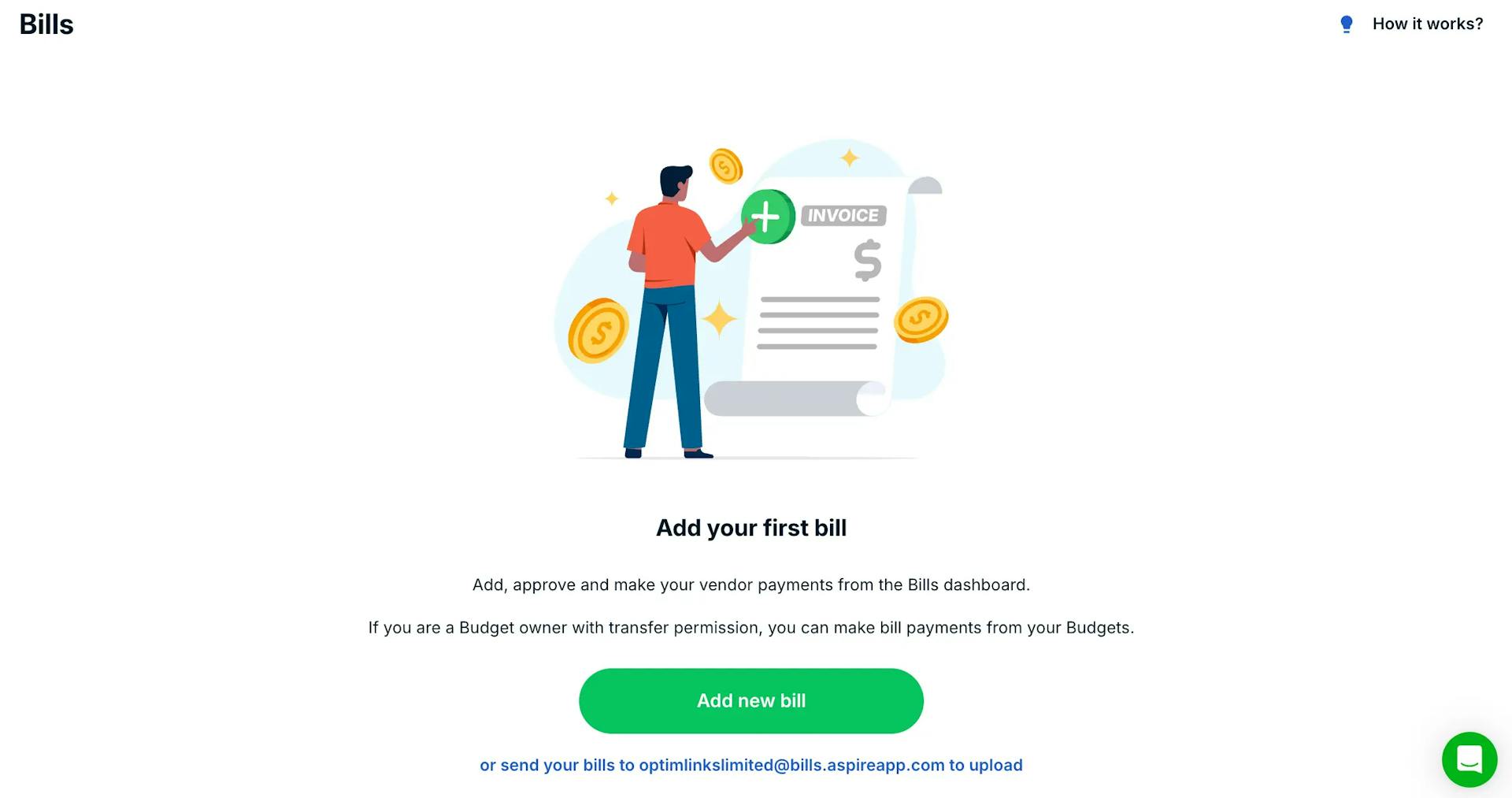
While Invoicing handles money coming in, the Bills feature manages money going out. This is where you track and pay your vendors, suppliers, and service providers.

The Bills module lets you upload or forward invoices from your suppliers, track their due dates, and pay them directly from your Aspire account. Instead of juggling email attachments and calendar reminders, you have a centralized view of everything you owe.

Key capabilities include status tracking (pending, paid, overdue), due date management, and direct payment integration.

Aspire vendor bills payment and tracking

Payroll Processing

Aspire's Payroll feature is designed for companies that need to pay employees or contractors regularly. It goes beyond simple batch payments by providing a structured workflow for salary disbursements.

The Payroll dashboard shows key metrics: total payroll processed (historically) and number of employees paid. You can create payroll batches, save drafts for review, and process payments on your schedule.

Budgets & Spend Control

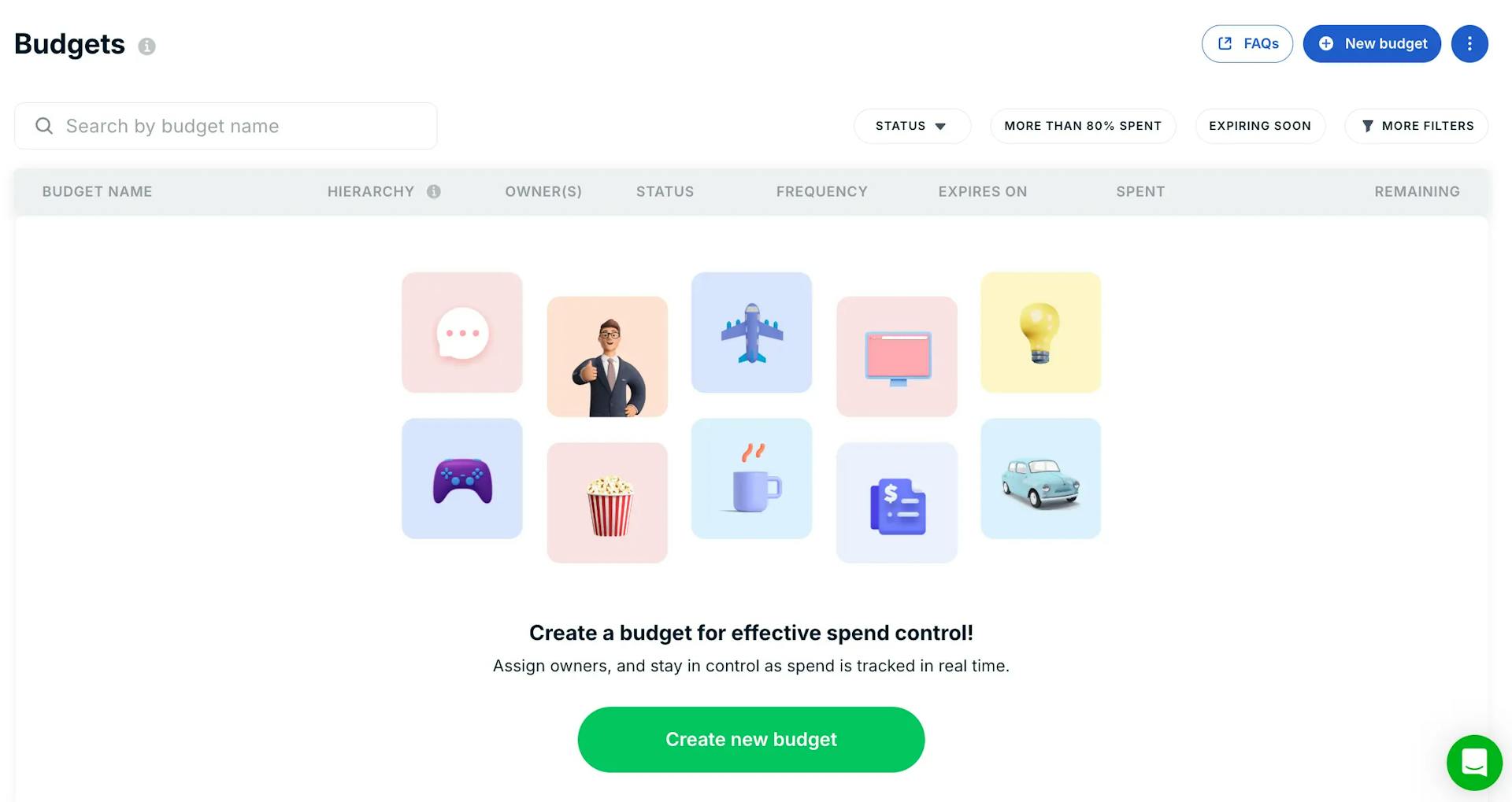
The Budgets feature is where Aspire's expense management capabilities really shine. You can create budgets for departments, projects, teams, or any category that makes sense for your business.

Each budget can be configured with a name, hierarchy (for nested budgets), assigned owner(s), status, frequency (one-time or recurring), expiration date, and spending limit. Smart filters help you stay on top of potential issues: "More than 80% spent" flags budgets approaching their limits.

When you issue corporate cards, you can link them to specific budgets, spending on that card automatically deducts from the associated budget.

Aspire budget management with category tracking

Claims & Reimbursements

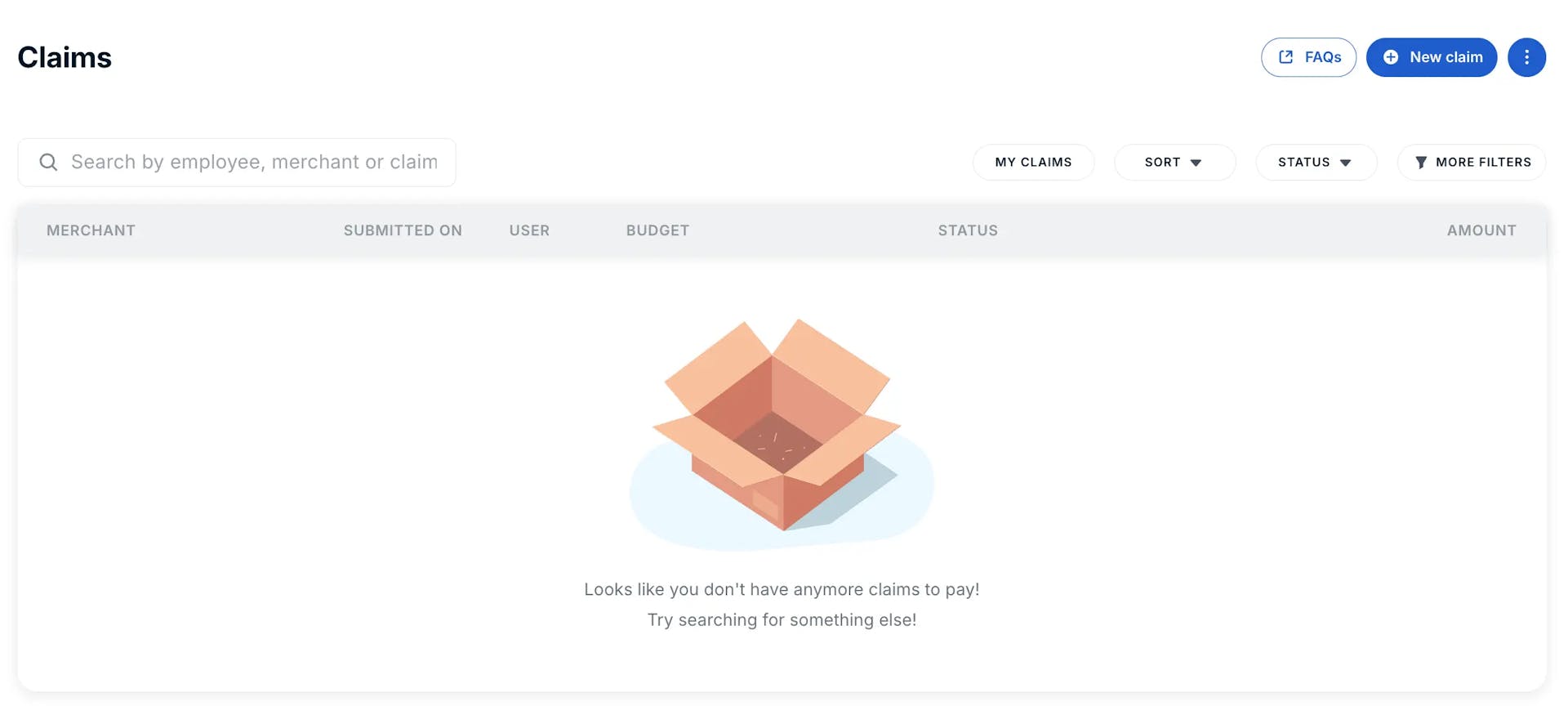
Not every expense goes through a corporate card. When team members pay out-of-pocket for business expenses, the Claims feature handles reimbursement requests.

Employees can submit claims with merchant details, receipt attachments, and categorization. Managers see pending claims in a central dashboard with key information: merchant name, submission date, submitting user, associated budget, status, and amount.

Aspire expense reimbursement claims dashboard

Analytics & Reporting

Aspire's Analytics section provides financial visibility across your business with several reporting views.

Funds Overview shows your opening balance, closing balance, and net change over a selected period. Money In / Money Out breaks down your income and expenses by counterparty and category. Receivables & Bills tracking shows aging analysis for both incoming and outgoing payments with aging buckets (≥7 days, <7 days, ≤30 days, 31-60 days, 61-90 days, >90 days).

Employer of Record (NEW in 2026)

The newest addition to Aspire's platform is Employer of Record (EOR), a service that lets you hire employees in countries where you don't have a legal entity.

How it works: Aspire (through their EOR partners) becomes the legal employer of your international hires. They handle local employment contracts, payroll processing, tax withholding, statutory benefits, and compliance. You manage the employee's day-to-day work.


The EOR service includes:

  • Local legal employment - Compliant hiring without setting up a foreign subsidiary
  • Compliant contracts - Employment agreements that meet local labor laws
  • Global payroll services - Salary payments in local currency with proper tax handling
  • Employee benefits - Statutory benefits plus optional additions
  • All-in-one HR platform - Onboarding, document management, and employee records
  • Global tax compliance - Proper withholding and reporting in each jurisdiction

Pricing starts at USD $399 per employee per month. This is competitive with standalone EOR providers like Deel ($599/month) or Remote ($699/month).

Integrations

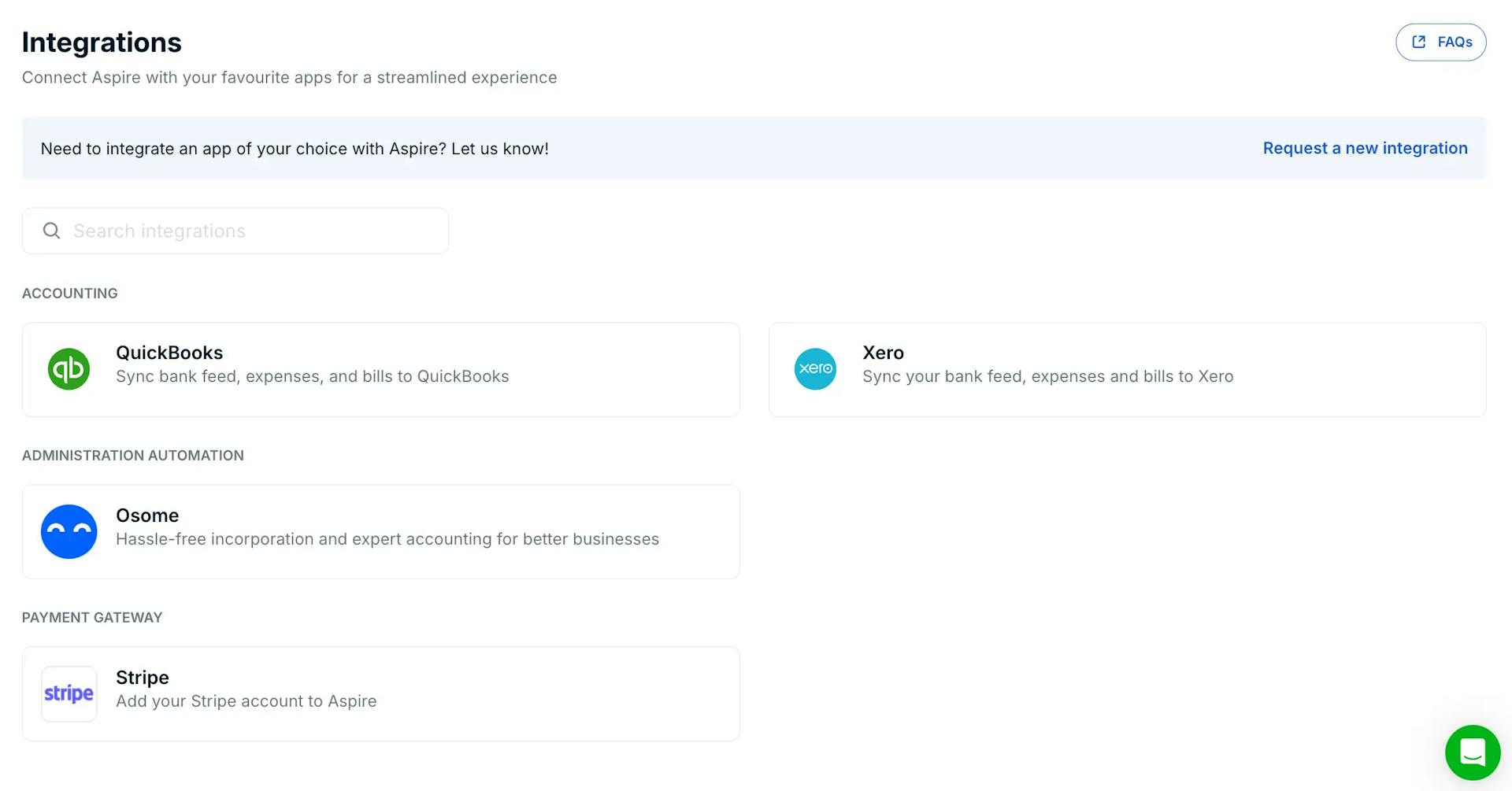
Aspire connects with popular business tools across three categories:

Accounting: QuickBooks and Xero for automatic transaction syncing.

Administration Automation: Osome for incorporation and accounting services.

Payment Gateway: Stripe to connect your payment collection.

Aspire also offers a "Request a new integration" option and APIs available upon request for custom integrations.

Aspire integrations with accounting software

Aspire Pricing & Fees

Aspire Pricing Breakdown 2026

Monthly PlanBase fee$0/month
CurrenciesMulti-currency accounts13 currencies
FXExchange rateFrom 0.18%
TransfersInternational transfersIncluded
TransfersLocal transfersIncluded
CardsPhysical cards1st card free per user
CardsVirtual cardsUnlimited
CardsCashback1% on Ads & SaaS
TeamAdmin/Finance usersUnlimited
TeamEmployee usersUnlimited
SoftwareInvoices, Bills, Budgets, Claims, AnalyticsIncluded
SupportAvailability7 days a week
EOREmployer of RecordFrom $399/employee/month

Pricing accurate as of January 2026. Visit aspireapp.com for current rates.

Pros & Cons of Aspire

An honest assessment based on the features reviewed

Pros
  • All-in-One Platform

    Account management, cards, invoicing, bills, payroll, and expense tracking in a single interface.

  • Multi-Currency Accounts

    13 currency wallets with local account details. Receive USD via ACH, EUR via SEPA.

  • Fast Onboarding

    Account opening takes days, not weeks. No branch visits. Fully digital KYC.

  • $0 Monthly Fee

    No base monthly cost. Pay only for what you use (FX, EOR, etc.).

  • Modern Interface

    Clean, intuitive design that's far better UX than traditional banking portals.

  • Granular Spend Controls

    Budgets, card limits, and approval workflows for real control over company spending.

Cons
  • Not a Licensed Bank

    Aspire is an EMI/payment services provider. Some vendors may require a "real" bank account.

  • No Deposit Insurance

    Funds not covered by SDIC. Protected via segregated accounts but not government-insured.

  • Limited Integrations

    Only 4 integrations (QuickBooks, Xero, Osome, Stripe). Missing Sage, FreshBooks, etc.

  • EOR Costs Add Up

    $399/employee/month = $4,800/year per person. Expensive for larger teams.

  • Basic Invoicing

    Works but lacks recurring invoices, time tracking, or client portals.

Aspire vs Alternatives

Business Account Comparison 2026

AspireFintech/EMI13 currenciesYesYesYes$399/mo
Wise BusinessFintech/EMI40+ currenciesYesYesNoMulti-currency focus
AirwallexFintech/EMI20+ currenciesYesYesNoHigh-volume FX
HSBC BusinessTraditional BankMultiYesNoNoCredibility & credit
DBS BusinessTraditional BankMultiYesNoNoSingapore presence

Data accurate as of January 2026. Features and pricing may vary.

Recommendation: Consider opening accounts with 2-3 providers for redundancy. Many businesses use Aspire for day-to-day operations and maintain a traditional bank account for situations that require it.

Aspire Review Verdict: Is It Worth It?

Aspire is ideal for:

  • Startups and early-stage companies that want to move fast and start transacting in days rather than weeks
  • Solo founders and small teams who want account management, cards, invoicing, and expense tracking in one place
  • Businesses with international clients or contractors who benefit from multi-currency accounts
  • Companies testing new markets before committing to full incorporation (via EOR)

Aspire is NOT ideal for:

  • Businesses requiring traditional bank credibility (some landlords, enterprise clients, government contracts)
  • Companies with complex treasury needs (credit facilities, trade finance)
  • Large teams where EOR costs become prohibitive ($399 × 20 employees = $96,000/year)

Get More Business Account Reviews & Insights

  • New fintech and bank reviews as we publish them
  • Practical tips for foreign entrepreneurs in SG, HK & UAE

Frequently Asked Questions

Common questions about Aspire business accounts.