Menu
Based on a real business verification

Payoneer Account Setup Review: Real Verification Process & Common Issues

Payoneer promises setup in 3 days. Here's what actually happened.

An honest review of Payoneer based on real experience setting up a business account. Rejected documents, endless KYC loops, blocked payments and whether it's still worth it in.

60 Days: From registration to working account
Document Guide: Which documents get approved (and rejected)
Recipient's Bank Account: Why digital banks don't work (and what does)
Honest Verdict: What works, what doesn't, and who should use it
GrowAcrossPublished
8 min readLast updated

Key Criteria to Evaluate International Digital Banks

Fintech business banking evaluation requires systematic assessment across six critical dimensions: regulatory licensing, currency support, fee structure transparency, integration capabilities, deposit protection, and operational restrictions. Each criterion carries different weight depending on business model, transaction volumes, and geographic focus.

Regulatory Licensing Assessment

Banking licenses provide the highest protection level with deposit insurance up to statutory limits. E-money licenses require fund safeguarding but offer no insurance protection. Agent banking arrangements depend on the principal bank's license status. Singapore's MAS, Hong Kong's HKMA, and UAE's CBUAE each maintain different licensing standards and consumer protections.

Currency Support & Geographic Coverage for Multi-Country Operations

  • Multi-currency accounts: Native support for 5+ major currencies with competitive exchange rates
  • SWIFT network access: Direct correspondent banking relationships vs third-party payment processors
  • Local payment systems: Integration with domestic clearing systems for faster, cheaper transactions
  • Regulatory compliance: CRS/FATCA reporting capabilities and sanctions screening systems

What is Payoneer and How Does It Work for Businesses?

Payoneer is a financial services company that provides international money transfer and digital payment services. Founded in 2005 and publicly traded on NASDAQ (PAYO), it serves over 5 million customers in more than 190 countries.

For businesses, Payoneer offers local receiving accounts in multiple currencies (USD, EUR, GBP, and others), allowing your international clients to pay you as if you had a local bank account in their country. This eliminates expensive SWIFT fees and makes cross-border payments faster and cheaper.

Key features include multi-currency accounts, a Mastercard debit card, marketplace integrations (Amazon, Fiverr, Upwork), and B2B payment solutions. Payoneer is regulated as a licensed money transmitter in the US and authorized by the FCA in the UK.

But is Payoneer actually good in practice? That depends on your tolerance for bureaucracy. Here's my real experience.

Why I Needed Payoneer for International Business Payments

I run a Hong Kong-registered limited company. My clients are primarily in Europe, paying in EUR. The problem: receiving EUR directly to a Hong Kong bank account means high SWIFT fees and poor exchange rates. I needed a European IBAN so my clients could pay via simple SEPA transfer.

I needed a solution that would give me:

  • A local EUR receiving account (so clients pay like a domestic transfer)
  • Reasonable FX fees for EUR to USD or HKD conversion
  • The ability to withdraw to my traditional bank account

Payoneer seemed perfect on paper: local receiving accounts in 70+ currencies, 0.50% FX fees, and a physical Mastercard. Their marketing promised account setup in "a few simple steps."

Here's what actually happened.

Payoneer Registration Process: Step-by-Step Setup

The initial signup was straightforward. I provided:

  • Company registration documents
  • Passport copy
  • Proof of address
  • Company bank details

Within hours, I received a welcome email confirming my registration and directing me to complete verification.

The email mentioned specific requirements for my jurisdiction and directed me to provide documentation for approval. Simple enough, I thought. I was wrong.

Payoneer_welcome_email

Obstacle 1: Bank Statement Rejection

A few days after registration, I received an email requesting additional verification.

Payoneer requesting additional details for account verification

They wanted a bank statement showing:

  • Account owner name
  • Bank account number
  • Bank logo
  • Bank name
  • Date of issue (not older than 3 months)

I submitted my statement. Rejected.

Document rejection email - bank statement didn't meet requirements

The reason? What I learned the hard way: Payoneer does NOT accept statements from digital banks or neobanks.

If you're using Airwallex, Wise Business, Revolut Business, or similar fintechs as your primary bank, your documents will likely be rejected. They require statements from traditional banks like HSBC, Citi, or local equivalents — if you don’t have one yet, check our guide on how to open a business bank account as a non-resident.
I resubmitted using my HSBC statement. Still had to go through multiple rounds.

Obstacle 2: The Endless KYC Loop

After resolving the bank statement issue, I thought I was done. Then came another email.

Applications are reviewed within 3 business days" — my experience was very different

"Typically, account applications are reviewed within 3 business days but can sometimes take a bit longer."

Three days passed. Then a week. Then another email asking for MORE documents.

Yet another request for additional information

The cycle repeated:

  1. Submit documents
  2. Wait 3-5 business days
  3. Receive request for additional documents
  4. Repeat

The support was nearly useless. Emails got generic responses. Phone support couldn't access my specific case details. I was essentially navigating this alone.

Support response offering alternative verification method

After 6 weeks of back-and-forth, my account was finally approved. Total time from registration to approval: 2 months.

Obstacle 3: Payment Rejected

Even after approval, problems continued. A European client sent me a payment of several hundred euros. Payment blocked.

Payment rejected because it came from a personal bank account

The issue: Payoneer considered that my client paid from their personal bank account instead of their company account. Payoneer's receiving accounts only accept payments from business bank accounts.

The payment was returned to my client within 7-10 business days. No fees charged, but a significant delay and an awkward conversation explaining what happened.

How I solved it: I ask the client to pay directly on a local traditionnal bank account.

Payoneer Verification Timeline: How Long It Really Takes

From Registration to First Payment

  1. 1
    Initial registration

    Quick and easy online form

    Day 1
  2. 2
    First document request

    Expected — standard KYC

    Day 2
  3. 3
    Bank statement rejected

    First setback

    Day 7
  4. 4
    Resubmission + wait

    Days 8-21

    Multiple rounds
  5. 5
    KYC additional requests

    Days 22-45

    Endless verification loop
  6. 6
    Account approved

    Finally!

    Day 60
  7. 7
    First payment received

    Payoneer promises few days. My reality: 2 months.. Working smoothly since

    Day 65

What Actually Works Well with Payoneer (After Verification)

Once approved, Payoneer does deliver on its core promises:

Local Receiving Accounts

I now have a EUR receiving account via Banking Circle S.A. (a licensed EU bank). My European clients pay via standard SEPA transfer — no SWIFT fees, fast arrival (1-2 business days), and they pay the same as if paying any local European company.

SWIFT USD receiving account for global wire transfers

I also activated a USD SWIFT receiving account for clients outside Europe. Zero loading fees from Payoneer's side.

Competitive FX Rates

Caption: 0.50% fee for EUR to USD conversion — verified December 2025

The 0.50% conversion fee is competitive. For a €1,000 payment, I pay €5 in fees (verified December 2025). Much better than the 2-4% I was losing with traditional bank transfers.

Multi-Currency Wallet

I can hold EUR, USD, GBP and convert between them on demand. Useful for managing cash flow and timing conversions when rates are favorable.

The Mastercard

Both virtual (instant) and physical cards available. Linked to my balance, works globally. The 1% cashback during promotional periods is a nice bonus.

For a full comparison of traditional banking options, see our guides to Hong Kong business banking and Singapore business banking.

Payoneer Pros & Cons: The Honest Assessment

Pros
  • Fast transfers once set up

    Payments arrive within 1 business day

  • Local receiving accounts

    EUR (Banking Circle S.A.), USD, GBP, and 40+ currencies

  • Low FX fees

    0.50% for conversions (verified December 2025)

  • Multi-currency wallet

    Hold and convert between 40+ currencies

  • Physical & virtual cards

    Mastercard with cashback promotions

  • SWIFT USD account

    Receive wire transfers from any country

  • Legitimate & regulated

    Licensed in US, UK FCA authorized, NASDAQ listed

Cons
  • Setup is painful
  • Support is unhelpful

    Generic responses, can't access your case

  • Traditional banks only

    Digital banks/neobanks not accepted

  • KYC can block funds

    Payments held pending random verification

  • No personal transfers

    Rejects payments from personal accounts

  • Platform sometimes unstable

    Occasional slow loading, downtime

Documents That Got Approved

Verification Checklist
0 of 6 completed0%

Annual Account Fee Update

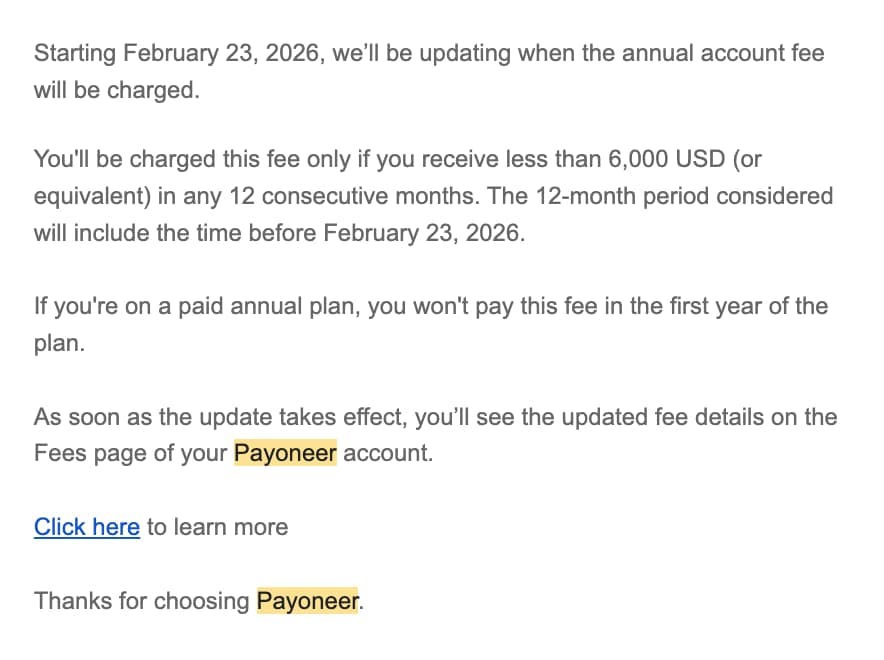
Starting February 23, 2026, Payoneer is updating when the annual account fee will be charged. This fee only applies if you receive less than 6,000 USD (or equivalent) in any 12 consecutive months. The 12-month period considered will include the time before February 23, 2026. If you're on a paid annual plan, you won't pay this fee in the first year of the plan. Updated fee details will appear on the Fees page of your Payoneer account once the update takes effect.

Payoneer_Update_Fee_Feb2026

Final Verdict: Is Payoneer Worth It for Businesses in 2026?

Yes, but with caveats.

Once Payoneer is set up and working, it solves a real problem for businesses receiving international payments. The 0.50% FX fee is competitive, the local receiving accounts eliminate SWIFT fees for your clients, and the multi-currency wallet is genuinely useful.

But the onboarding experience is painful. Plan for 1-2 months, not 3 days. Have a traditional bank account ready. Don't rely on their support.

Would I do it again? Yes, because the end result works. But I'd start the process much earlier and have backup payment methods ready during the wait.

Who should use Payoneer:

  • Businesses receiving regular payments from Europe, US, or UK
  • Companies that need multi-currency accounts
  • Freelancers working with international marketplaces (Amazon, Upwork, Fiverr)
  • Anyone whose clients prefer local bank transfers over SWIFT

Who should look elsewhere:

  • Businesses that only use digital banks (you'll need a traditional account first)
  • Anyone who needs immediate account access
  • Businesses receiving many payments from individuals (personal accounts get rejected)
Payoneer_logo_2026What users are saying about Payoneer
3.7(62.3k)
See reviews →

International Payment & Banking Insights

Practical guides to help you navigate banking challenges and payment solutions for your international business.

How to Open a Business Bank Account as a Non-Resident

Navigate the complex world of international business banking without setting foot in the country.

Success depends on choosing the right jurisdiction, bank type, and having comprehensive documentation ready.

Best Digital Banks International Business Evaluation Framework

How do you evaluate 200+ digital banking options across 15+ jurisdictions for international business? Evaluation framework trumps provider rankings - regulatory status and cost structure determine suitability.

Documents Required Company Formation Abroad Complete Checklist

Master the paperwork maze with our comprehensive guide covering 15+ jurisdictions.

Proper document preparation is the difference between smooth incorporation and costly delays.

Frequently Asked Questions

Common questions about Payoneer, answered honestly.

Get the International Payments Checklist

  • Complete document requirements by country
  • Common rejection reasons & solutions
  • Step-by-step verification guide
  • Timeline expectations by jurisdiction